How to Post a Short on YouTube: A Guide to Going Viral
 Mahmudul Hasan
Posting a YouTube Short is your fast track to getting in front of a massive new audience. The process is straightforward: create a vertical video under 60 seconds, craft a catchy title that includes #Shorts, and you can upload it right from your phone or computer. This simple format is one of the most powerful tools available for reaching a huge, engaged audience almost instantly.
Why YouTube Shorts Are a Growth Supercharger

Before we jump into the "how," let's talk about the "why." YouTube Shorts aren't just another video feature; they operate in their own ecosystem built for rapid-fire discovery. Traditional long-form videos heavily depend on search results and your existing subscriber base. Shorts, on the other hand, are pushed out by an aggressive algorithm to new viewers it thinks will be interested.
This opens up a massive opportunity for explosive channel growth. Forget the slow, grinding process of building an audience from scratch. A single, well-made Short can put your content in front of thousands—or even millions—of potential subscribers literally overnight.
Tapping into a Global Audience
The sheer scale of this is hard to overstate. Shorts have absolutely blown up, now pulling in over 90 billion Shorts viewed daily worldwide as of 2025. To put that in perspective, that's a staggering 200% growth from the 30 billion daily views back in 2021. The audience for this format is growing at an incredible pace.
And it’s a global audience, too. Roughly 75% of views on a Short come from outside the creator's home region. Just think about that—a simple clip you upload could easily find fans on the other side of the world.
This trend reflects a major shift in how people consume content. Viewers crave quick, entertaining, or valuable videos that get straight to the point. When you master Shorts, you're aligning your strategy perfectly with what modern audiences want.
Case Study: How One Creator 10x'd Their Subscribers
Countless creators have completely transformed their channels by adding Shorts to their strategy. Take, for example, a small gaming channel that had been stuck at 5,000 subscribers for a year. Their long-form content was solid, but growth was slow. They started creating 30-second Shorts showcasing hilarious in-game glitches and unexpected moments.
Within three months, one of their Shorts went viral, hitting 2 million views. That single video drove over 50,000 new subscribers to their channel. These quick videos acted like powerful commercials for their main channel, driving a stream of new, interested viewers to check out their longer content. To really make this work, it's worth digging into understanding why short-form video resonates with today's viewers.
Posting a YouTube Short Directly from Your Phone

For most creators, the phone is command central for Shorts. The YouTube app is essentially an all-in-one studio, giving you everything you need to shoot, edit, and publish in minutes. It all starts with a single tap.
Just open the YouTube app and hit the big plus icon (+) at the bottom of your screen. A menu will slide up; choose “Create a Short.” This takes you right into the Shorts camera, which is where the magic happens. It’s your control panel for the entire creative process.
Mastering the In-App Creative Tools
Before you hit that record button, take a second to look at the toolkit on the right side of the screen. These are your secret weapons for making dynamic videos without ever leaving the app.
Here’s a practical breakdown of how to use them:
- Speed: Filming a quick tutorial on how to tie a knot? Slow it down to 0.5x to make it easy to follow. Showing a time-lapse of a painting? Speed it up to 3x for a satisfying, fast-paced clip.
- Timer: This is a lifesaver for filming yourself. Set a 10-second countdown to give you time to walk into the frame and start a dance trend. You can also drag the slider to pre-set the recording to stop after just 15 seconds, perfect for a punchline.
- Filters: Find a filter that matches your brand's aesthetic. A warm, vintage filter might be perfect for a cooking channel, while a clean, bright filter works well for tech tutorials. Sticking to one helps build a recognizable style.
Adding Audio and Advanced Effects
If there’s one thing that can make or break a Short’s reach, it’s the audio. Look for the “Add sound” button at the top of the camera screen. Tapping it opens up YouTube’s massive audio library, packed with trending songs and viral soundbites. Using a popular track is one of the easiest ways to get your Short in front of more eyes.
Actionable Tip: Don’t just slap any trending song on your video. Find audio that enhances the story. For example, use a dramatic, swelling sound effect for a reveal or a popular comedic soundbite timed perfectly with a funny moment. The right sync can turn a simple clip into something genuinely memorable and shareable.
After you've got your clips, you can also play around with the Green Screen effect. This awesome tool lets you drop any photo or video from your phone’s gallery in as your background. A movie review channel could use this to place themselves in front of the film's poster while giving their hot take. The possibilities are endless for creating polished Shorts from the palm of your hand.
Bringing Polished Shorts from Your Desktop to the World
While the YouTube app is great for quick, on-the-fly content, sometimes you need more firepower. For those meticulously crafted videos edited in programs like Adobe Premiere Pro or DaVinci Resolve, uploading from your computer is the only way to go. It ensures every pixel of your hard work makes it to the screen.
The good news is, YouTube makes this incredibly simple. But before you even open your browser, you need to make sure your video file ticks two crucial boxes. It absolutely must be under 60 seconds long, and it needs to be in a vertical or square aspect ratio. Get those two things right, and YouTube's algorithm will automatically recognize it as a Short.
Your Desktop Upload Playbook
Once you're logged into YouTube Studio, the process feels familiar. Just hit that "Create" button in the top-right corner, then "Upload videos," and select your file. This brings you to the details page, which is where the real optimization begins.
This is your moment to craft a killer title and a compelling description. But there’s one tiny detail that makes all the difference.
To make absolutely sure YouTube knows what you've made, you must include the hashtag #Shorts in your video's title or description. It's like a secret handshake with the algorithm, telling it to push your video straight into the Shorts feed for maximum exposure.
Could a vertical video under 60 seconds get picked up without the tag? Maybe. But why leave it to chance? Adding #Shorts removes any doubt.
For creators looking to bake these best practices into their workflow from the very beginning, using a pre-made YouTube Shorts template can be a huge time-saver. It helps ensure all your technical specs are spot-on before you even think about hitting that upload button.
How to Optimize Your Shorts for the Algorithm
Getting your video uploaded is just the starting line. If you want to get real traction, you need to give the YouTube algorithm a crystal-clear roadmap of who needs to see your content. That’s what optimization is all about—it turns a hopeful upload into a strategic play to maximize your reach.
Think of it this way: every element of your Short, from the title to the tags, is a signal. Get those signals right, and YouTube will do the heavy lifting for you.
Crafting Titles and Hashtags That Work
Your title is everything. You have maybe three seconds to hook someone before they swipe on to the next video. Long, descriptive titles that work for regular videos will kill your Short's momentum. You need something short, punchy, and packed with curiosity.
For example, instead of "Flying My New Drone Over an Abandoned Building," try something like, "You Won't Believe What This Drone Found." See the difference? One is a description; the other is an invitation.
Next up is the #Shorts hashtag. This isn't optional—it's your entry ticket. Putting #Shorts in your title or description is the most direct way to tell YouTube, "Hey, this is a Short, put it in the feed!"
But don't just stop there. Add two or three other highly relevant hashtags that define your niche. If you’re making a quick recipe video, something like #Shorts #QuickRecipe #EasyMeals works perfectly. If you're stuck, tools like a YouTube Hashtag Generator can be a great starting point for finding relevant tags.
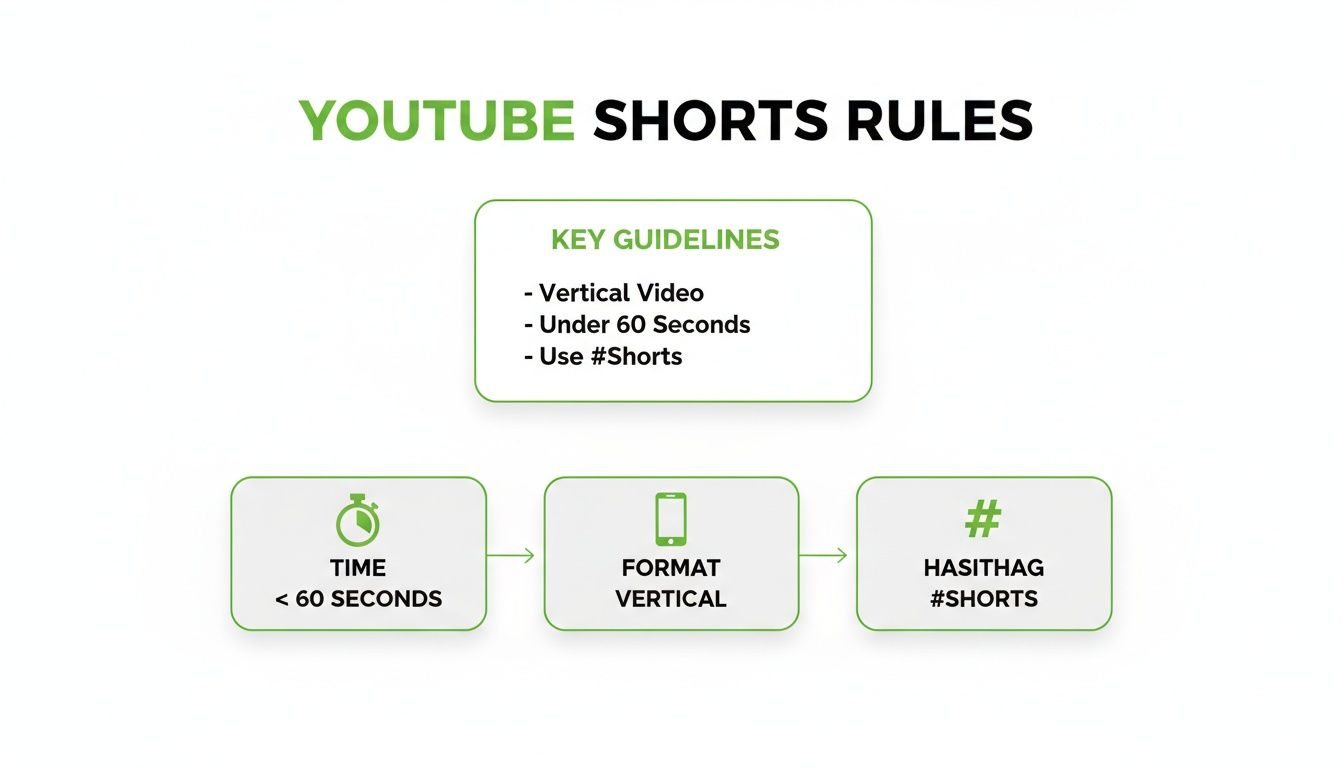
This infographic nails the three core rules for any video to even qualify as a Short: keep it under 60 seconds, use a vertical format, and include that all-important hashtag.
As for the description, keep it brief. A sentence or two that adds a little context to your title is all you need. This is also a great spot to link to a related long-form video or your other social media profiles. If you’re looking for more advanced tactics on converting viewers into subscribers, we've got a whole playbook on https://motionlaps.ai/en/blog/how-to-grow-youtube-channel-fast.
The Overlooked Impact of Thumbnails
I know what you're thinking—custom thumbnails don't show up in the Shorts feed, so why bother? Because your Shorts live in other places, too!
They appear on your channel page, in YouTube search results, and in the "suggested videos" sidebar next to longer content. In these spots, a well-designed, compelling thumbnail is your video's billboard. It’s what convinces someone to click when they discover your content outside the endless scroll of the Shorts feed. Don't skip this step.
Before you hit publish, run through this quick checklist. It's a simple way to see if you're setting your Short up for success or leaving views on the table.
Shorts Optimization Checklist Before You Post
| Optimization Element | Poor Example (What to Avoid) | Great Example (What to Do) |
|---|---|---|
| Title | "My Quick and Easy Omelet Recipe for a Healthy Breakfast" | "The 30-Second Omelet You Need to Try #Shorts" |
| Hashtags | #cooking #food #breakfast #eggs #omelet #healthy #yummy #recipe |
#Shorts #EasyRecipe #BreakfastIdeas (Plus a few more highly relevant tags in the description) |
| Description | A long paragraph detailing every ingredient and step. | "This fluffy omelet is my go-to for a busy morning! Full recipe video here: [link]" |
| Call to Action | (None) | "What's your favorite breakfast? Let me know in the comments!" (In the video or pinned comment) |
| Thumbnail | A blurry, default frame from the middle of the video. | A bright, clear shot of the finished omelet with bold, easy-to-read text like "30-Sec Omelet." |
Treating each of these elements with care is what separates the Shorts that get a few hundred views from those that go viral.
Common Mistakes That Kill Your Shorts Views
It's frustrating to put effort into a Short only to see it get zero traction. More often than not, it's a few simple, avoidable mistakes that are holding your content back from a massive audience.
YouTube's short-form video feature is an absolute powerhouse, pulling in a staggering 70-90 billion daily views. When Shorts first rolled out, early adopters saw their viewership jump by 500% or more, grabbing a first-mover advantage. The opportunity is still there, but you have to play by the rules. You can dig deeper into YouTube's incredible growth stats on Global Media Insight.
Technical and Content Blunders to Avoid
Let's start with the non-negotiables. Getting the technical details wrong is the fastest way to make your Short invisible to the algorithm.
- Uploading Horizontal Video: This is an instant disqualifier. Shorts must be in a vertical (9:16) aspect ratio. If you upload a standard horizontal video, YouTube won't recognize it as a Short.
- Exceeding the 60-Second Limit: There’s no wiggle room here. A video that’s even 61 seconds long won't make the cut. Be brutal in your editing and keep it under that one-minute mark.
- Using Unauthorized Music: A copyright strike can get your video taken down or demonetized. The safest move is to stick with the audio library YouTube provides. It's not worth the risk.
Beyond the technical stuff, the biggest content sin is a slow start. You have about two seconds to hook someone before they swipe away. Forget the long, cinematic intro—get straight to the action and deliver on the promise of your title immediately.
Clearing Up the Confusion: Your YouTube Shorts Questions Answered
Jumping into Shorts can bring up a few questions. Getting the details right from the start can be the difference between a video that gets lost and one that takes off. Let's tackle some of the most common things creators wonder about.
Do I Really Need to Use the #Shorts Hashtag?
You bet. While YouTube is pretty good at figuring out what a Short is based on its vertical format and length, you should still add #Shorts to your title or description.
Think of it as a direct signal to the algorithm. It removes any guesswork and helps ensure your video lands exactly where it belongs: in the Shorts feed. It’s a simple step that gives your content its best shot.
Can I Actually Make Money from YouTube Shorts?
Absolutely. If you're in the YouTube Partner Program, you're eligible to earn a slice of the ad revenue from ads that run between videos in the Shorts feed. It all works through a revenue-sharing model specifically for Shorts.
On top of that, don't forget about other monetization tools. Your fans can still use things like Super Thanks or sign up for Channel Memberships directly from your Shorts.
The real goal is to create content that doesn't just rack up views, but builds a community that's genuinely excited to support your work.
When Is the Best Time to Post a Short?
There’s no magic one-size-fits-all answer here—it all comes down to your audience. The most reliable data is sitting right inside your own YouTube Studio. Go to your Analytics and click on the 'Audience' tab to see the exact hours and days your viewers are on the platform.
If you're just starting out and don't have much data yet, here's a solid rule of thumb:
- Weekday afternoons (around 3-6 PM)
- Weekend mornings (around 9 AM-12 PM)
These windows often catch people during their downtime and can give your video a nice initial boost.
What’s the Perfect Length for a Short?
You've got a full 60 seconds to play with, but shorter is often much, much better. I've found the sweet spot tends to be somewhere between 15 and 45 seconds.
The YouTube algorithm heavily favors videos with high audience retention and lots of replays. A short, punchy video that gets right to the point is far more likely to be watched all the way through—and then watched again.
Making one viral Short is tough; making them consistently is a whole other challenge. MotionLaps can take the heavy lifting off your plate by automating the entire creation process. We'll turn your ideas into polished, engaging videos in just a few minutes, handling everything from the script to the voiceover and visuals. You get to focus on strategy and channel growth. See how easy it is at https://motionlaps.ai.