Blog Post to Video AI A Practical Guide to Repurposing Content
 Mahmudul Hasan
Think of all the fantastic content sitting on your blog right now. Every guide, listicle, and in-depth article is a goldmine of expertise you've already spent hours creating. But what if I told you that a huge chunk of your potential audience will never read it?
That's the reality. Many people just prefer watching to reading. By turning your blog posts into short videos with AI, you can tap into this massive audience on platforms like TikTok, Instagram Reels, and YouTube Shorts. It’s one of the smartest ways to get more mileage out of the work you've already done.
Unlock Your Content's Hidden Potential
It's easy to publish a blog post and move on to the next one, but you're leaving so much value on the table. Repurposing isn't just about creating more content; it's about making your best content work harder for you.
- Find a New Audience: You'll connect with people who live on video-first platforms and would never have stumbled upon your blog otherwise.
- Grab More Attention: Let's be honest, dynamic videos with music and motion are just more engaging and shareable than static text. This means more likes, more comments, and a much wider reach.
- Give Your SEO a Nudge: When you link back to your original article from places like YouTube, you're sending positive signals to Google that can help strengthen your site's authority over time.
The Rise of AI in Video Creation
The move to video isn't new, but AI's role in it is exploding. The numbers back this up, too. By 2026, 63% of video marketers were already using AI to help create or edit their videos. That’s a huge jump from 51% just the year before. Another 19% said they planned on starting soon, which tells you everything you need to know about where this is headed.
It makes perfect sense. AI video tools have torn down the old barriers. You no longer need a production crew, expensive software, or a film degree to create great-looking videos.
The whole point is to breathe new life into your proven content. By applying smart content repurposing strategies, you can turn a single high-performing article into multiple video assets, each tailored for different platforms and audiences, maximizing your return on investment.
Instead of taking a week to produce one video, you can now generate a handful of high-quality clips in an afternoon. This kind of efficiency means you can post consistently, keep your audience hooked, and figure out what works without burning through your budget. It’s a powerful way to get your best ideas out there and start making a real impact on new channels.
Selecting and Preparing Your Article for Video
Let’s be honest, not every blog post you’ve written is destined for TikTok or Reels. The very first step in this whole process—and maybe the most important—is digging through your content library to find the right articles. Picking the right raw material from the start makes everything that follows a whole lot easier.
Look for posts that already have a clean, easy-to-follow structure. I've found that listicles, how-to guides, and articles built around a surprising statistic or a great case study are absolute goldmines. These formats are practically begging to be turned into the short, punchy videos people love to watch.
Pinpoint Your Video-Worthy Content
Put on your video producer hat for a minute and scroll through your own archives. Which articles have elements that you can almost see on screen?
- Actionable Lists: A post like “5 Ways to Improve Your Morning Routine” is a layup. Each point can become its own scene.
- Strong Data Points: Got an article about industry trends? Pulling out one killer statistic and visualizing it can make for a powerful, attention-grabbing video.
- Compelling Narratives: Customer success stories or case studies are perfect because they have a built-in story arc—a beginning, middle, and end.
- Step-by-Step Guides: Tutorials are a natural fit for video. You’re literally showing people what to do, one step at a time.
This diagram really nails the core idea of taking your written content and letting an AI tool transform it into a video.
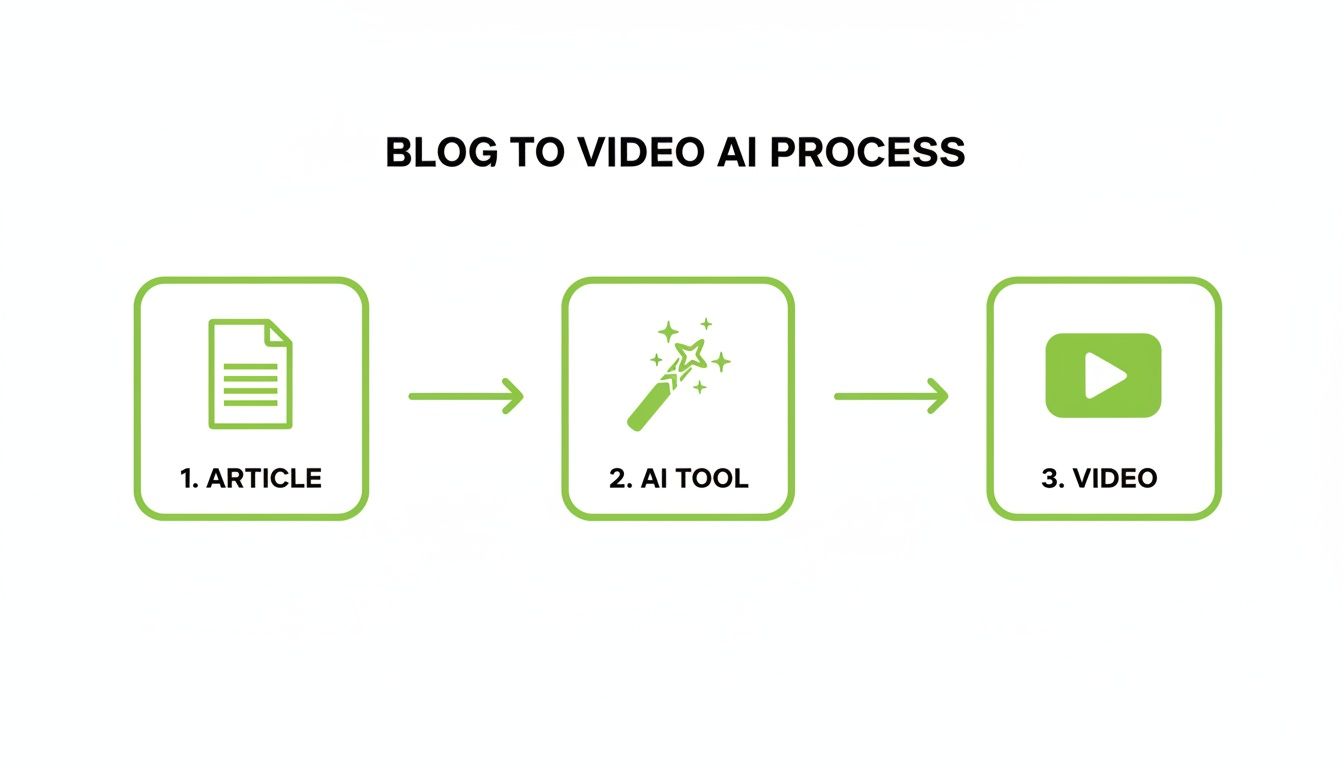
It shows how you can move from a static article to a dynamic video through a simple, automated workflow.
Once you’ve found your article, it's time to get ruthless with the editing. A 1,500-word blog post is not going to fit into a 60-second video. You need to distill it down to its most potent form. Find the single most important takeaway, the most powerful quote, or the one tip that will make people stop scrolling.
Your goal isn't to cram the entire article into a video. It's to pull out one core idea and give it a new, highly engaging life. This focused approach is what works on fast-paced social feeds.
Condensing Your Message for Impact
Think of your big, comprehensive blog post as a treasure chest of smaller video ideas. A single ultimate guide could easily fuel three to five different short videos, each hitting a unique sub-topic or angle. This is a fantastic way to promote one piece of pillar content over and over again without being repetitive.
Case Study in Action: Imagine a real estate agency with a blog post titled "The Ultimate Guide to Staging Your Home for a Quick Sale." Instead of one long, overwhelming video, they could create a series of high-impact shorts:
- "3 Curb Appeal Hacks That Cost Under $100": A quick, visual guide showing simple exterior improvements.
- "The #1 Mistake Home Sellers Make (and How to Avoid It)": A punchy video focusing on decluttering, with before-and-after shots.
- "How the 'Bread in the Oven' Trick Actually Works": A fun, sensory-focused video about creating an inviting atmosphere.
This approach makes content creation incredibly efficient. You’re not starting from a blank page; you're just finding new ways to package the valuable insights you already have. By prepping your content like this, you’re teeing up your blog post to video AI tool for success by giving it a clear, concise message to work with.
Writing a Script That Actually Hooks People
Here's a hard truth: a great video isn't about fancy visuals. It all comes down to the script. The way we write for a blog—with detailed sentences meant for scanning—is the complete opposite of what works for video.
Video scripts need to be punchy, direct, and conversational. They’re written for the ear, not the eye. That means you can't just copy and paste your article text and expect it to work. The real job is translating your key ideas into short, spoken lines that sound natural when narrated by an AI voice.
Trim the Fat, Keep the Message
Think of your original article as a detailed blueprint and your script as the quick, guided tour. The first step is to mercilessly break down long paragraphs into bite-sized sentences. Every single line should deliver one clear thought.
It's about shifting your mindset from explaining to stating.
To give you a clearer picture, here’s a look at how you can adapt different parts of your blog for a video script. This isn't just about shortening things; it's about rephrasing for impact.
Blog Post Content To Video Script Conversion
| Blog Content Type | Original Text Example | Video Script Adaptation |
|---|---|---|
| Detailed Explanation | "Implementing a consistent morning routine has been shown to significantly boost productivity by reducing decision fatigue and establishing positive momentum for the day." | "Want to boost your productivity? It starts with your morning routine. It cuts down on stress… and sets you up to win the day." |
| List or Bullet Points | "Our new software includes features such as automated reporting, real-time analytics, and seamless third-party integrations to enhance workflow efficiency." | "Tired of manual reports? Our new software gives you… Automated reporting. Real-time analytics. And seamless integrations. Everything you need." |
| Statistical Data | "According to our recent study, businesses that adopted this strategy saw an average revenue increase of 25% over six months." | "What if you could increase revenue by 25%? Our latest study shows it’s possible. Here’s how." |
| Call-to-Action | "For a comprehensive overview of these strategies, download our free eBook, 'The Ultimate Guide to Digital Marketing,' by clicking the link below." | "Want the full guide? Tap the link in our bio to download our free eBook. Don’t miss it." |
This table shows the core principle at work: transform detailed, written prose into short, impactful lines that an AI voice can deliver with energy.
You Have Three Seconds. Make Them Count.
The world of short-form video is a ruthless battle for attention. You have a handful of seconds—at most—to stop someone from scrolling. It's no surprise that 63% of videos with the highest click-through rates get their main point across in the first three seconds.
Your hook has to be sharp and immediate. Forget gentle introductions. Start with a provocative question, a surprising stat, or a bold statement that makes someone think, "Wait, what?"
Your script’s first line isn't just an introduction; it's a sales pitch for the next 57 seconds of your video. If it fails, the rest of your brilliant content doesn't stand a chance.
Give Your Script a Beginning, Middle, and End
Once your hook has done its job, the rest of the script needs to deliver on that initial promise. A simple, effective flow works best.
- The Problem: Quickly name the pain point your audience knows all too well. (e.g., "Tired of your blog posts getting zero traffic?")
- The Solution: Present your core tip or idea as the clear answer. (e.g., "Turn them into videos with AI.")
- The Proof: Back it up with a quick example or benefit. (e.g., "You'll reach a huge new audience on TikTok and Reels.")
Finally, wrap it up with a clear call-to-action (CTA). What do you want them to do next? Read the full blog? Follow your account? Leave a comment? Tell them directly. (e.g., "Follow for more content tips!")
This structure ensures every video has a purpose. It guides viewers from being passive watchers to active participants. While a good blog post to video AI tool can help automate parts of this, truly great results come from understanding these scriptwriting fundamentals first. For a deeper dive into crafting compelling scripts, our guide on AI scriptwriting is a great resource.
Generating Your Video with the Right AI Voice and Visuals
Alright, your script is polished and ready to go. Now for the fun part: bringing it all to life. This is where you feed your creative plan into a blog post to video AI platform and watch the magic happen. The key is to perfectly pair your script with the right AI voice and visuals to turn a simple text file into something people actually want to watch.
Your first big decision is the AI voice. Don't just pick one at random; this choice sets the entire personality and mood of your video. Are you going for an energetic, hyped-up vibe for a motivational clip? Or do you need a calm, steady voice for a tutorial? Think of it like casting an actor—the voice has to fit the part.
Today's AI voice generators give you an incredible amount of choice, with different genders, accents, and even emotional inflections. A mismatch here can feel really off and instantly make your content seem less credible.
Choosing Your AI Voiceover
When you’re listening to the options, pay attention to a few key things:
- Pace: Is the voice fast and exciting, or slow and deliberate? The speed should match your topic. A faster pace works for high-energy content, while a slower narration adds weight to more complex information.
- Tone: Does it sound friendly, professional, serious, or playful? Make sure the tone aligns with the emotional feel of your script.
- Clarity: Can you understand every word? The best AI voices are so clear and natural-sounding that they're hard to tell apart from a human narrator.
If you want to dive deeper into the possibilities, our guide to the best AI voiceovers is a great place to start.
Aligning Visuals with Your Message
Once the voice is locked in, it's time to think about the visuals. Let's be honest, the visuals are what stop the scroll. They need to be eye-catching, but more importantly, they need to be consistent. A video that jumps between photorealistic shots, then to cartoons, then to abstract graphics just feels messy and unprofessional.
Cohesion is everything. You need to land on an aesthetic that makes sense for your brand and topic. A tech company might go for a sleek, futuristic look, while a wellness brand would probably connect better with soft, natural imagery.
Here’s a practical, actionable workflow:
- Define Your Style: Platforms like MotionLaps let you pick from styles like animated, comic book, photorealistic, and even dark fantasy. Actionable Tip: Create a simple "brand style guide" for your videos. Decide on 1-2 primary visual styles and stick to them to build brand recognition.
- Prompt for Specifics: Let your script guide your visual prompts. If your script says "boosting productivity," your prompt could be something like, "a focused professional working efficiently at a clean, modern desk, bright and airy lighting, photorealistic style."
- Ensure Relevance: Each image or clip has to directly support what's being said at that moment. The visuals should enhance the narration, not pull attention away from it.
For truly dynamic content, it's worth leveraging advanced AI tools like Google Gemini, which is great at handling both text and visual inputs.
The final piece of the puzzle is background music. Music is the emotional glue that holds everything together. An inspiring track can make a simple message feel powerful, while a chill, ambient soundscape can help viewers focus. With your voice, visuals, and music all set, you’re ready to hit render and watch your finished video come together.
Optimizing and Distributing Your Video for Maximum Impact

You’ve put in the work and used a blog post to video AI tool to create a killer clip. That's a huge win, but don't close your laptop just yet. The best video in the world is just a file on your hard drive until people see it.
Now comes the final, crucial step: getting your video in front of the right eyeballs. This means optimizing and distributing your new content strategically so it can actually do its job.
Every social platform speaks a slightly different language, and a generic, copy-paste approach just won't cut it. To get traction on places like YouTube Shorts and TikTok, you have to tailor your title, description, and hashtags to fit what their algorithms and audiences are looking for.
Platform-Specific Optimization Checklist
Think of this as your pre-flight check before you send your video out into the world. Taking a few minutes to nail these details can make the difference between a video that soars and one that fizzles out.
For YouTube Shorts:
- Magnetic Title: Keep it short and spark some curiosity. Asking a question like "Did you know this marketing secret?" or making a bold claim works wonders.
- Keyword-Rich Description: Write a quick sentence or two that includes your main keyword. Don't forget to drop a link back to the full blog post to drive traffic.
- Relevant Hashtags: You'll want a mix of broad and specific tags. Always include #shorts, then add more targeted ones like #AItools or #ContentMarketing.
For TikTok:
- Trending Audio: This is a neat trick. Try adding a popular trending sound at a very low volume behind your main AI voiceover. It's a simple way to give the algorithm a signal to show your video to more people.
- Punchy Captions: Your on-screen text acts as your title here. It needs to be super short and punchy, usually echoing the video's opening hook.
- Niche Hashtags: Mix it up. Use a massive tag like #fyp but also include smaller, more specific hashtags that your ideal audience is following.
A lot of people treat distribution as an afterthought, but that's a huge mistake. I'd argue you should spend just as much time on your video's metadata as you did on the creative side. It's what separates content that gets discovered from content that gets buried.
Boosting Discoverability and Engagement
Beyond the basic metadata, there are a couple of extra things you can do to give your video a real performance boost.
First off, always burn in captions or subtitles. A massive number of people scroll their feeds with the sound off. Captions make your video accessible and ensure your message gets across, even when it's silent. Most blog post to video AI tools do this automatically.
Second, for platforms like YouTube, take the time to create a custom thumbnail. While Shorts can auto-generate one, a well-designed thumbnail with bold text or a compelling image can make a huge difference in click-through rates.
Thinking about the bigger picture, a smart distribution plan should also include tactics for AI Search Engine Optimization, making sure your content shows up in new search environments. By nailing these final optimization steps, you're not just making a video—you're creating a powerful asset that will drive traffic and build your brand.
Got Questions? We've Got Answers
Jumping into a new content strategy always brings up a few questions. When it comes to turning your blog posts into AI videos, a few common ones seem to pop up for everyone. Let’s clear those up so you can get started with confidence.
How Long Should My AI-Generated Video Be?
You'll want to aim for the 30 to 60-second sweet spot, especially for platforms like TikTok and YouTube Shorts. This is a big one: don't try to cram a whole 2,000-word article into a single video. It just doesn't work.
Think of that beefy blog post as a goldmine for three or four separate 45-second videos. Each short clip can laser-focus on a different key point, a single game-changing tip, or a jaw-dropping statistic. This "micro-content" strategy is way more effective for grabbing attention and lets you promote the same article multiple times with fresh, bite-sized content.
Do I Need Video Editing Skills to Use These Tools?
Nope, not at all. The entire point of a dedicated blog post to video AI platform like MotionLaps is that it's built for people who aren't video editors. You can forget about wrestling with timelines, keyframes, or intimidating software.
The process is almost completely hands-off. You feed it the script, pick a voice and a visual style you like, and the AI does the rest. It syncs the audio and visuals, creates the scenes, adds background music, and spits out a polished, ready-to-post video. The steep learning curve of traditional video editing is completely gone.
Will an AI Voice and Visuals Feel Fake?
It's a valid concern, but authenticity really comes from your message and personality, not how the video was made. Today’s AI voices are surprisingly realistic, offering a huge range of tones and styles to match your brand.
It's the same with the visuals. You can customize them to create a consistent look that feels professional and intentional. As long as you're starting with a great script pulled from your own expert blog content, you're just delivering your authentic ideas through a different medium.
The key to authenticity is alignment. If you pick an AI voice and a visual theme that genuinely feel like you, the content will resonate with your audience, no matter how it was produced.
How Do I Know if This Strategy Is Actually Working?
You need to track the right numbers to see what's really happening. Don't get hung up on just one metric; look at the complete picture to understand your impact.
Here are the key things I always keep an eye on:
- Audience Resonance: Watch the basics like views, watch time, likes, and shares. These are your first clue that you’re creating content people actually want to see.
- Traffic Generation: This is the big one. Measure the click-through rate on the link in your video description or bio that leads back to the original blog post. This tells you if your videos are successfully driving traffic.
- Audience Growth: Finally, keep an eye on your follower count. A great video strategy doesn't just entertain your current followers; it should be attracting new people and turning them into loyal fans.
Ready to turn your best blog posts into videos that actually get seen and drive traffic? With MotionLaps, you can create professional, viral-ready short-form content in minutes, no editing experience needed. Let our AI handle the production so you can focus on creating great content. Start creating for free today at MotionLaps.