Choosing Your Social Media Video Editor: A Practical Guide for Creators
 Anika Riply
At its core, a modern social media video editor is a specialized platform built for one thing: creating engaging, short-form video content at lightning speed, without needing a film degree to do it. Think of it less like traditional editing software and more like a smart production assistant. It automates the tedious stuff—like writing scripts, recording voiceovers, and finding the right visuals—so you can go from a simple idea to a finished video in minutes.
Why Modern Video Creation Demands a New Kind of Editor

If you’ve ever opened a program like Adobe Premiere Pro, you know it can feel like being handed a toolbox and told to build a car just to get to the grocery store. That old-school, "workshop" approach of manually piecing together clips, syncing audio, and endlessly tweaking timelines just can't keep up with the relentless pace of TikTok, YouTube Shorts, and Instagram Reels.
In today's fast-moving social media world, creators and brands need a vehicle that's ready to drive, not a box of parts. A dedicated social media video editor acts as your production partner, handling all the technical grunt work. This frees you up to focus on what actually matters: your message and connecting with your audience.
The Shift From a Manual Toolkit to an Automated Production Line
The real game-changer is the workflow. Traditional editing is a slow, manual assembly line where you're responsible for every single step. A modern, AI-powered editor, on the other hand, is a fully automated production line. You provide the initial idea, and it handles the rest.
This completely changes the creative process for anyone making content:
- Speed and Volume: You can pump out several high-quality videos in the time it used to take to painstakingly create just one.
- No More Technical Roadblocks: A great idea no longer gets stuck behind a steep learning curve or complicated software.
- Focus on Strategy: Your time is better spent on brainstorming, planning your content calendar, and engaging with your community—not stuck in the weeds of editing.
This new breed of tool does the heavy lifting, turning your raw concepts into scroll-stopping videos almost instantly. For a deeper dive into this, check out our detailed comparison of AI versus traditional video editing.
Here’s a simple way to think about it: A traditional editor gives you a hammer, nails, and a pile of wood, then tells you to build a chair. A modern social media video editor hands you a finished, beautifully designed chair and just asks where you’d like to sit.
Keeping Pace With a Booming Market
This isn't just about convenience; it's a massive market shift. The global video editing software market was valued at $3.09 billion in 2023 and is expected to hit $5.13 billion by 2032. What's driving that growth? The insatiable demand for short-form video, where publishing speed and consistency are the keys to winning.
Ultimately, today’s top creators aren't just looking for another piece of software. They’re looking for a competitive edge. The right social media video editor gives them exactly that, making it possible to create content at the speed of culture itself.
The Core Features That Power Viral Video Content
To really get what separates a game-changing social media video editor from a simple trimming tool, you have to look past the marketing bullet points. The best tools don't just add more buttons to press; they offer smart, elegant solutions to the biggest headaches in content creation. They turn hours of tedious, repetitive work into just a few clicks.
So, let's unpack the "why" behind the features that actually move the needle. Each one is built to solve a real-world problem creators run into every single day, from staring at a blank screen to worrying about copyright strikes. It's not about the tech for its own sake—it's about what that tech lets you do.
AI Scriptwriting: The Cure for Creative Block
Every great video starts with a good idea and a solid script, but let's be honest—the blank page is terrifying. An AI script generator isn't just a time-saver; it’s like having an idea partner on call 24/7. It taps into proven storytelling formulas and engagement hooks to give you a strong foundation to build on.
- Practical Example: A personal finance creator wants to make a video about the "50/30/20 budget rule." Instead of starting from scratch, they input the prompt: "Explain the 50/30/20 budget rule for young professionals in a 60-second TikTok video." The AI generates a script with a hook like, "Stop guessing where your money goes!" followed by clear, concise explanations for each category and a call-to-action to "Follow for more money tips!" This takes the creator from idea to a shoot-ready script in under a minute.
Automated Neural Voiceovers: Studio Quality Without a Mic
Not too long ago, getting a professional voiceover meant shelling out for expensive microphones, finding a soundproof room, and spending hours recording and editing. Today, a top-tier social media video editor uses neural AI voices that are so realistic, they're nearly impossible to tell apart from a human narrator.
This is a massive win for anyone creating "faceless" content. It means solo creators and small businesses can churn out polished, authoritative videos at scale without ever having to record their own voice, all while maintaining perfect audio quality every single time.
You just paste your script, pick a voice that fits your brand's vibe—energetic, calm, professional, you name it—and the AI creates a clean, broadcast-quality audio track in seconds. No more background noise, no more flubbed lines and retakes, and no more technical audio engineering headaches. It truly levels the playing field.
Vast Royalty-Free Asset Libraries
One of the biggest anxieties for any creator is the looming fear of a copyright strike. Using the wrong song or a random video clip you found online can get your content pulled or your whole channel demonetized. That's why an integrated library of royalty-free assets isn't a "nice-to-have"—it's a must.
A powerful platform like MotionLaps gives you instant access to millions of high-quality stock videos, images, and music tracks right inside the editor. This solves several problems at once:
- It Saves Time: You can stop wasting hours digging through third-party stock websites.
- It Eliminates Copyright Risk: Every single asset is pre-cleared for you to use on social media.
- It Creates Visual Harmony: The AI can even automatically find and suggest visuals that perfectly match the context of your script, making the final video look seamless and professional.
By taking these common obstacles off your plate, the editor becomes a full-blown production suite. If you're curious to learn more about the specific ingredients that make content take off, you can dig into our guide on what makes a video go viral.
A Comparison of Video Editor Capabilities
To really see how these features change the game, it helps to put the old way of doing things side-by-side with the modern, automated process.
Here’s a look at how a traditional video editing workflow stacks up against an AI-powered one.
Traditional vs AI-Powered Video Editor Capabilities
| Feature | Traditional Video Editor (Manual Process) | AI-Powered Social media Video Editor (Automated Process) |
|---|---|---|
| Scripting | Manual writing, research, and formatting from scratch. | AI generates scripts based on a simple prompt, complete with hooks and CTAs. |
| Voiceover | Requires recording equipment, multiple takes, and audio editing. | One-click generation of lifelike neural voiceovers from text. |
| Visuals | Manually searching and licensing stock footage from third-party sites. | Integrated, royalty-free library with AI that suggests relevant visuals. |
| Synchronization | Painstakingly timing visuals, text, and audio on a complex timeline. | Automatic synchronization of voiceover, visuals, and background music. |
This shift from manual to automated isn't just about saving a little time. It means a single idea can become a polished, ready-to-post video in a tiny fraction of the time it used to take. That kind of efficiency is exactly what you need to scale your content and really stand out.
Meet Your New Creative Director: AI
Artificial Intelligence has moved far beyond being a tech buzzword; it's now the creative engine for the next generation of social media content. Think of an AI-powered social media video editor less like a cold piece of software and more like a personal creative director—one that works around the clock to bring your vision to life. It takes over the most draining and time-consuming parts of video production, freeing you up to focus on what really matters: strategy and storytelling.
This new way of working is a game-changer for content creation. In the past, making a polished video meant hiring a team: a scriptwriter, a voice actor, a videographer, and an editor. Now, AI brings all those roles together into one smart platform. This is a massive leg up for solo creators and small businesses who can finally produce professional, engaging videos without a Hollywood-sized budget.
From Manual Labor to Creative Partnership
The real magic of an AI creative director is its ability to execute your vision with incredible speed and precision. You provide the high-level direction—the topic, the tone, the intended audience—and the AI handles the nitty-gritty execution. It’s a genuine partnership where your human creativity guides the AI's powerful production engine.
Here’s what that collaboration actually looks like:
- AI-Powered Scripting: Instead of staring at a blinking cursor, you feed the AI a simple prompt. In moments, it generates a compelling script with a strong hook and a clear call-to-action. From there, you can easily tweak and refine it to add your unique brand voice. If you want to dive deeper, check out our guide on AI-powered scriptwriting.
- Automatic Visuals: The AI reads your script and instantly finds or creates relevant visuals to match the context of every scene. This completely eliminates the hours you'd otherwise spend scrolling through stock footage libraries.
- Flawless Voiceovers: Forget about booking studio time or buying expensive mics. The AI generates a perfect, human-sounding voiceover directly from your script in seconds, giving you consistent, high-quality audio every single time.
AI doesn't replace creativity; it amplifies it. By automating the repetitive tasks, it gives you back the time and mental energy to brainstorm bigger, more impactful ideas. It's the ultimate assistant, working tirelessly behind the scenes so you can shine.
The AI Takeover in Video Production
This move toward AI-driven video isn't some fringe trend—it's happening right now, and it's happening fast. A staggering 51% of video marketers are already using AI tools for video creation and editing. That number is up from just 18% two years ago, marking a 128% increase that shows just how quickly the industry is adopting automated production. The global AI video generator market reflects this momentum, with projections showing it will grow from $534.4 million to $2,562.9 million by 2032.
To see how artificial intelligence is reshaping visual content creation, it's worth exploring the capabilities of dedicated AI Video Generators to understand where the industry is headed. These platforms are quickly becoming essential for staying competitive.
When you let AI step into the creative director role, you unlock the ability to produce high-quality, faceless content at a scale that was previously unimaginable. You're not just making videos; you're building a content engine that works for you 24/7, consistently engaging your audience and driving growth while you're already dreaming up the next big idea.
Your Step-By-Step Workflow From Idea to Published Video
It’s one thing to see a list of features for a modern social media video editor, but watching them all work together is where you really see the power. The journey from a raw idea to a polished, ready-to-post video is surprisingly straightforward. You don't need a background in video production—just a concept and a few minutes to steer the AI.
Let's walk through a simple, three-step workflow that gets you from a blank canvas to a scroll-stopping final cut. Think of this as a mini-tutorial to get you creating right away.
The flowchart below maps out this entire AI-powered process, from scripting your initial idea all the way to finalizing the video for publishing.
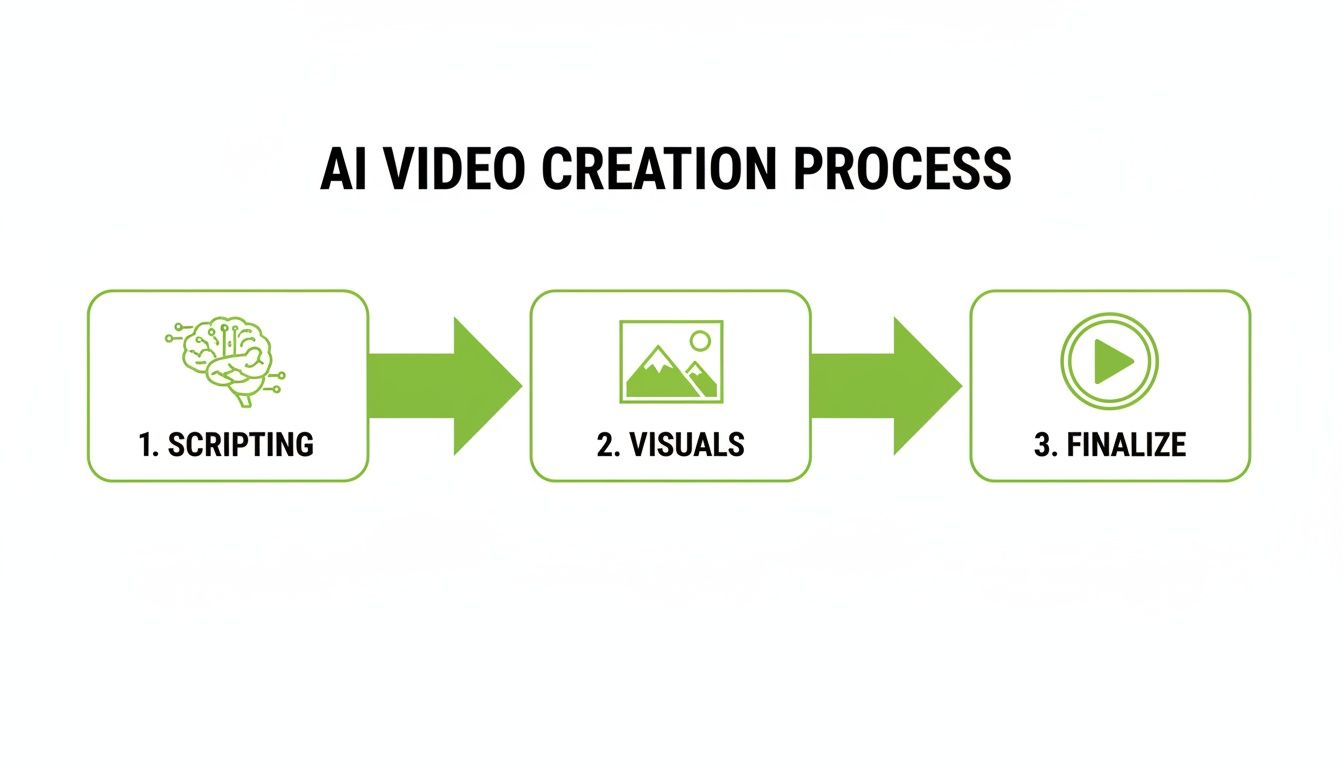
As you can see, the process is broken down into three clear stages, with AI stepping in to handle the heavy lifting at every point. This makes production smooth, fast, and efficient.
Step 1: Craft Your Script
Every great video starts with a script. This is the bedrock of your content, and with an AI-powered editor, it's also the easiest part. You just feed the AI a simple prompt—it could be a topic, a question, or a quick summary of what you want your video to say.
The AI then gets to work, generating a full script that's built for social media engagement. This isn't just a block of text; it's structured for impact:
- A Powerful Hook: The first line is designed to grab attention within the first 3 seconds. Instead of something flat like, "Here are some benefits of drinking water," the AI might suggest, "You're probably not drinking enough water, and it's costing you."
- A Clear Narrative: The script flows logically, making your information easy for anyone to follow and digest.
- An Actionable CTA: It wraps up with a clear call-to-action (CTA), telling viewers exactly what to do next—whether that's to comment, follow your page, or click a link.
Once the AI gives you a draft, you can easily tweak it to perfectly match your brand’s unique voice. It’s the perfect blend of AI speed and your personal touch.
Step 2: Design Your Visuals and Voice
With the script locked in, it's time to bring it to life with visuals and sound. This is where a modern social media video editor truly shines by automating the entire process. First, you'll pick an AI-generated voice that fits the mood. Need an energetic narrator for a motivational clip? Or maybe a calm, authoritative voice for a tutorial? You can find the right fit with a single click.
Next up is the visual style. Platforms like MotionLaps offer a whole menu of aesthetics, from photorealistic and cinematic to animation and even comic book styles. Once you've made your choice, the AI analyzes your script sentence by sentence, automatically sourcing or generating visuals that match the narration. The end result is a polished, professional video where the visuals and voiceover are perfectly in sync.
Step 3: Finalize With Sound and Publish
The last step is all about adding those final, professional touches. This is where you can drop in some background music to set the tone and boost the video's emotional impact. A good editor will have a built-in library with thousands of royalty-free tracks, so you never have to worry about copyright strikes. The AI can even suggest tracks that complement the pace and tone of your video.
Once the music is in, give everything one last look. When you're happy with it, you just hit render. The platform takes care of all the exporting and formatting, making sure your video is perfectly optimized for every social platform. Before you hit publish, it's always a good idea to make sure you're meeting platform-specific guidelines, like the recommended Facebook video ad size requirements.
This entire workflow—from a simple idea to a fully produced video—can be completed in just a few minutes. It turns video creation from a complex, technical headache into a simple, creative process that’s open to everyone.
How to Choose the Right Video Editor for Your Goals
Picking a social media video editor isn't about finding the "best" one on the market—it's about finding the best one for you. The right tool is the one that solves your biggest production headaches and lines up perfectly with what you’re trying to achieve with your content. To find it, you have to look past the flashy feature lists and start asking some honest questions about your own workflow.
Are you a solo creator grinding to build a personal brand? Or are you a marketing agency trying to keep a dozen different clients happy? The answer completely changes what you should be looking for. It’s all about matching the tool to the job.
First, Figure Out Your Creator Persona
Before you even start comparing pricing plans, take a minute to define who you are as a creator. Your specific goals, frustrations, and how much content you need to pump out will point you toward the right kind of solution.
Let's break down a few common creator types and the questions they should be asking.
1. The Solo Creator or Influencer
Your world revolves around building an audience and keeping them engaged. Time is your most precious resource, and posting consistently is the name of the game.
- Case Study: Alex, a fitness influencer, used to spend 4-5 hours planning, shooting, and editing a single workout tip video for Instagram Reels. By switching to an AI editor, Alex can now generate a script, voiceover, and visuals for a "30-second core workout" video in 15 minutes. This allowed Alex to increase output from 3 videos per week to 1-2 per day, leading to a 40% increase in follower growth in the first month.
- What you need: A tool built for speed and automation. An AI-powered editor like MotionLaps is a game-changer here. It handles the script, voiceover, and visuals, letting you jump from idea to finished video in minutes.
2. The Small Business Owner
You’re using video to make sales, show off your product, and build trust with customers. Your videos have to look sharp and on-brand, but you're working with a tight budget and even tighter deadlines.
- Practical Example: A local coffee shop wants to create short promotional videos for its new seasonal drinks. Using an AI editor, the owner inputs key features like "Pumpkin Spice Latte, cozy autumn vibes, made with real pumpkin." The AI generates a video with warm, inviting visuals, an upbeat soundtrack, and on-screen text highlighting the key ingredients. The whole process takes 10 minutes, costs a fraction of a professional video shoot, and results in a polished ad ready for Facebook and Instagram.
- What you need: A platform that locks in brand consistency and gives you access to royalty-free media. The ability to set a specific visual style or brand voice and stamp it onto every video is a must-have.
If you're a business owner or creator, putting your energy into social media video is a smart move. A staggering 69% of video marketers now say social media videos are their main focus, which tells you exactly where your audience is spending their time. And the proof is in the numbers—YouTube Shorts alone racks up over 70 billion daily views. You can dig into more of these trends in this comprehensive statistical report.
3. The Marketing Agency or Social Media Manager
You’re the ultimate multitasker, juggling multiple client accounts, each with its own unique voice, style, and content calendar. Your success is all about being efficient, scalable, and delivering results your clients can see.
- Case Study: A digital marketing agency manages social media for five different B2B clients. They adopted an AI video editor to streamline content creation. Now, they can take a single client blog post, paste the URL into the editor, and generate 3-4 different video shorts from it, each with a unique angle and CTA. This repurposing strategy allowed them to triple the amount of video content delivered to each client without increasing their team's headcount, leading to higher client retention rates.
- What you need: A powerful and versatile social media video editor designed for high-volume work. Managing different brand profiles, generating a wide range of visual styles, and automating the workflow is essential.
Matching the Features to Your Actual Needs
Once you know which persona fits you best, you can build a personalized checklist to evaluate different editors. This is how you cut through the marketing fluff and focus on the features that will actually make a difference for you. Instead of getting wowed by a feature you’ll never touch, you can zero in on the tools that solve your real-world problems.
Here’s a simple way to think about it as you compare your options:
| If Your Main Goal Is… | Then You Absolutely Need… |
|---|---|
| To Post More Frequently | AI Scripting & Voiceover: These features automate the most tedious parts, letting you create content at lightning speed. |
| To Maintain Brand Consistency | Customizable Styles & Templates: This ensures every video has a uniform look that strengthens your brand identity. |
| To Scale Content Across Clients | Multi-Project Management & Diverse Visual Options: This helps you efficiently manage different client needs from one dashboard. |
| To Repurpose Existing Content | Text-to-Video & URL-to-Video: Instantly turn blog posts, articles, or audio clips into fresh short-form videos. |
By taking this persona-first approach, you can choose a social media video editor that not only works for you today but also grows with you tomorrow. Whether you're a podcaster turning audio clips into video shorts or a manager creating daily content for clients, the right tool feels less like a piece of software and more like a partner in your success.
Your Action Plan for Getting Started Today
It’s one thing to feel inspired, but it's another thing entirely to turn that feeling into action. Let's close that gap right now with a simple, no-fluff checklist to get you from reading this guide to creating your first video.
This isn't about theory anymore. This is about taking real, tangible steps to bring your ideas to life and see for yourself just how quickly you can get going.
Your Quick-Start Checklist
Ready to jump in? We'll break it down into a few manageable tasks. Checking these off will give you the forward motion you need to start building a real video strategy.
-
1. Define Your Content Niche: What’s your corner of the internet? Getting laser-focused on a niche like "AI productivity hacks for students" or "quick vegan recipes" is how you attract a loyal audience. Be specific and own it.
-
2. Brainstorm Your First Three Video Hooks: The first three seconds are everything. Forget the full script for now and just come up with three powerful, attention-grabbing opening lines. Instead of a flat "Today I'm talking about coffee," try something punchy like "You're probably making your coffee wrong."
-
3. Outline One Core Idea: Now, pick your strongest hook and map out the main points. What’s the single most important thing you want your viewer to walk away with? Give your idea a simple structure: a hook to grab them, a middle that delivers value, and an end with a clear call to action.
The biggest hurdle in content creation is usually just overthinking that first step. The secret is to start small and build momentum. Your first video doesn't have to be perfect—it just has to be done.
Test the Workflow and Start Creating
The final piece of the puzzle is to just try it. The best way to understand how powerful modern tools are is to get your hands dirty and see for yourself how a good social media video editor can turn your concepts into reality.
Sign up for a free trial of a platform like MotionLaps and just play around. You'll get that instant feedback of watching your idea become a polished, professional-looking video in minutes. This hands-on experience is the fastest way to build confidence and kickstart your journey as a video creator.
Frequently Asked Questions
Jumping into a new video creation tool always brings up a few questions. Let's tackle some of the most common ones creators ask when they're looking for the right social media video editor.
Do I Need Editing Experience to Use an AI Video Editor?
Not at all. In fact, that's one of the biggest reasons these tools exist. They’re built for people with great ideas who don't have the time or desire to get bogged down in technical editing software.
Think about traditional editors like Adobe Premiere Pro. They have a notoriously steep learning curve packed with timelines, keyframes, and color grading panels. An AI editor takes all that complexity and moves it under the hood. All you have to do is bring the concept or script, and the tool does the heavy lifting to build the video for you. It's truly for everyone.
Here's a good way to think about it: you don’t need to be a mechanic to drive a car. In the same way, you don’t need to be a professional video editor to make amazing content with an AI tool. It's built for creators, not technicians.
What Kind of Content Can I Make?
A good social media video editor is like a Swiss Army knife—it can handle a ton of different formats, which is exactly what you need for any niche. The possibilities are pretty much endless.
For example, you can create:
- Educational Content: Whip up quick tutorials, explainers, and listicle videos perfect for YouTube Shorts and TikTok.
- Marketing and Ads: Generate compelling promo videos and ads for your products or services without hiring an agency.
- Faceless Content: Build entire channels around interesting topics using AI voiceovers and stock footage, no on-camera presence required.
- Repurposed Content: Breathe new life into old content by turning blog posts, articles, or even just a link into a fresh video.
This kind of flexibility is key to keeping your content calendar full and diverse without burning yourself out.
How Do AI Editors Compare to Traditional Software?
The main difference really boils down to workflow and speed. Traditional software gives you meticulous, frame-by-frame control, which is fantastic for a feature film or a highly artistic project. But that level of control costs you a ton of time and requires a deep skillset.
An AI-powered social media video editor, on the other hand, is all about efficiency. It’s designed to help you produce content at the pace social media demands. You might trade the ability to manually tweak every single transition, but you gain the power to get a finished, polished video in minutes instead of hours. For most creators and marketers trying to stay consistent, that trade-off is a huge win.
Ready to see what an AI-driven workflow can do for your content strategy? MotionLaps handles the entire creation process, turning your ideas into engaging, shareable videos in minutes. Start creating for free today!