How to Automate Social Media Posts and Scale Your Content: A Practical Guide
 Anika Riply
Automating social media posts means using smart tools to schedule and publish your content ahead of time. It's the secret to maintaining a consistent online presence without being glued to your phone 24/7. This strategic approach allows you to map out your content calendar, reach audiences in different time zones when they're most active, and, most importantly, frees you up to focus on strategy and genuine community engagement.
Why Smart Automation Is No Longer Optional
The old "post and pray" approach to social media is dead. For anyone serious about growing a brand or a following today, the question isn't if you should automate, but how you can do it smartly to gain a competitive edge.
Think of it as the engine that lets a one-person-show compete with a big company's marketing team. It’s how a creator can push out a steady stream of content to TikTok, Reels, and Shorts without completely burning out.
Smart automation goes beyond just saving time. It's about building a consistent, high-quality presence that keeps your global audience engaged. By scheduling posts, you ensure your best content lands in front of people at their peak activity hours, not just when it’s convenient for you. That reliability builds momentum and keeps your brand top-of-mind.
The Shift From Task Management to Strategic Growth
The true power of automation is unlocked when it frees up your most valuable asset: your creative brainpower. Instead of getting stuck in the hamster wheel of uploading, writing captions, and hitting "publish," you can finally focus on the activities that actually move the needle.
- Deeper Community Engagement: When your content machine runs in the background, you have more time to reply to comments, answer DMs, and build real relationships.
- High-Level Strategy: You can step back to see the bigger picture—analyzing what's working, spotting trends, and planning your next big move instead of just putting out daily fires.
- Creative Development: Automation gives you the mental space to brainstorm better ideas, script more compelling videos, and produce higher-quality work.
Case Study in Action: A boutique coffee roaster was spending 10 hours a week manually posting daily updates. By automating their core promotional and educational posts with a tool like Buffer, they cut that time down to just 2 hours. The freed-up 8 hours were reinvested into running live Q&A sessions on Instagram and creating behind-the-scenes "roasting day" video content, leading to a 40% increase in community engagement and a 15% lift in online sales within three months.
Automation Is the New Standard
This isn't a niche hack anymore; it's how the game is played. The data shows a massive shift across the board. By 2024–2025, the vast majority of marketing teams are leaning on automation for publishing and managing their workflows.
In fact, recent reports show that around 83% of marketing departments now automate their social posting. That number alone shows how vital this has become for achieving measurable growth and productivity. If you want to dig deeper, you can explore plenty of other social media automation statistics that paint a clear picture of this trend.
Ultimately, figuring out how to automate your social media is a core skill for scaling any brand online. This applies just as much to your paid advertising, too. To get a handle on streamlining those efforts for better ROI, it’s worth diving into the fundamentals of Facebook Ads automation. It’s all about building a system that works for you around the clock, turning your social channels into a reliable growth engine.
Building Your Automated Content Pipeline
To make social media automation work, you need a constant stream of content. This is where you build the "machine" that turns your raw ideas into a library of assets, ready to go. A solid content pipeline means you're never scrambling for something to post. It shifts content creation from a daily chore to a predictable, manageable process.
The goal is to stop creating one post at a time. Instead, you'll produce a week's or even a month's worth of content in one go. AI supercharges this, handling the heavy lifting of brainstorming, scripting, and even creating the visuals. This is how you transform your social media from a manual grind into an automated system that drives growth.
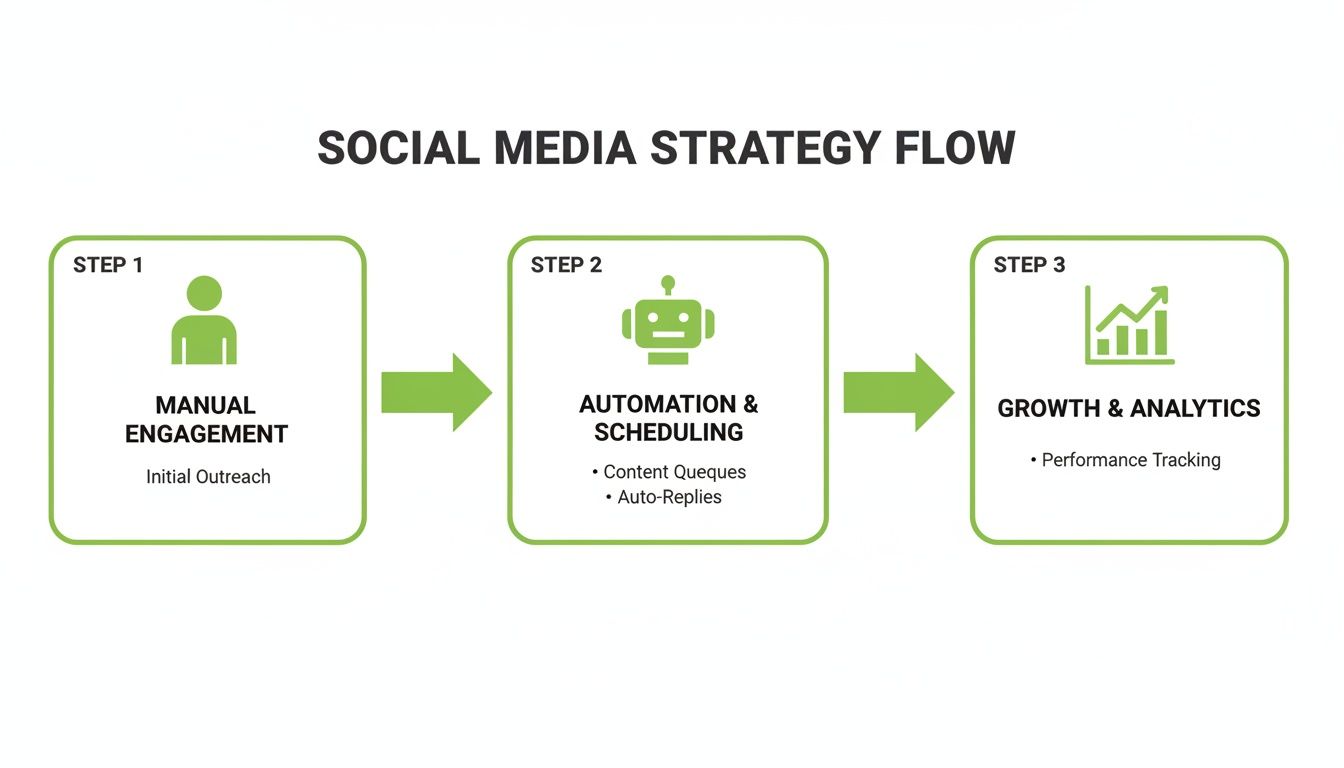
This flowchart shows the journey: you start with manual tasks, build an automated system, and ultimately scale your growth. It’s the blueprint for a sustainable social media presence.
Brainstorming Viral Topics with AI
Every great post starts with a solid idea. But instead of staring at a blank screen, you can use AI as an endless brainstorming partner. Modern AI tools can analyze current trends, see what your competitors are doing, and spit out dozens of angles on a single topic in seconds.
Actionable Example: Let's say your niche is "sustainable home living." You could prompt an AI with: "Generate 20 viral YouTube Short ideas about zero-waste kitchen hacks. Focus on quick, visual tips with surprising results that a beginner can do." Instantly, you'll get a list of clickable concepts, complete with potential hooks and titles like "The One Vegetable Scrap You Should Never Throw Away" or "Turn Your Old T-Shirt Into This Kitchen Essential."
This approach saves you hours of guesswork and makes sure your ideas are grounded in what people are already watching.
Generating Scripts and Visuals
Once your topics are locked in, it's time to bring them to life. This used to be the biggest time-sink—writing scripts, recording voiceovers, finding visuals. Now, integrated AI platforms like MotionLaps can handle this entire workflow.
You just feed it a prompt, like "Create a 45-second video about the Great Emu War in Australia." The AI then gets to work.
- It writes the script: A concise, snappy script optimized for short-form video.
- It creates the voiceover: A natural-sounding voice in whatever style or accent you need.
- It assembles the visuals: It finds or creates relevant images and clips that match the script's pacing.
- It adds the final touches: Background music and synchronized captions are added automatically for better accessibility.
What you get is a polished, ready-to-publish video in minutes, not hours. By doing this over and over, you can batch-create an entire week's worth of high-quality short-form videos in a single afternoon.
The real magic of AI in the content pipeline is its ability to crush multiple production steps at once. It collapses the time from idea to finished video, letting you scale up output without dropping the quality.
This automation fundamentally changes the game. Recent industry analysis shows that 79% of social pros say AI helps them speed up content creation, and about 65% use it for at least half of their posts. You can find more data on how AI is reshaping social media management and its impact on planning.
Assembling and Batching Your Final Assets
The last piece of the puzzle is organizing all these new assets into a library, ready for scheduling. This is where batching is your best friend. Instead of making one video and immediately posting it, you create a collection of assets organized by topic or theme.
This system guarantees you always have a backlog of approved content. When it's time to fill your social calendar, you just pull from your library. This separates the creative process from the scheduling process, making both far more efficient.
Plus, a full content library is perfect for smart repurposing. You can easily adapt a winning video for a different platform or revisit a popular theme with a fresh angle. For a deeper look, check out our guide on effective content repurposing strategies to get the most value out of every single asset you create.
Choosing the Right Tools for Your Automation Stack
Now that you have a pipeline brimming with content, it’s time to get it in front of the right people at the right time. This is where your automation stack comes in. The sheer number of tools out there can feel overwhelming, but once you understand the different categories, making the right choice becomes much simpler.
Think of it this way: some tools are like an all-purpose SUV, designed to handle a bit of everything, while others are like specialized sports cars, built for a single, powerful purpose. Your job is to pick the right vehicle for your specific journey.
Categorizing Your Options
The world of social media automation is crowded, but most platforms fall into one of three main buckets. Figuring out which bucket fits your needs is the key to getting a tool that aligns with your budget and goals without paying for features you’ll never touch.
-
All-in-One Platforms: Tools like Buffer, Hootsuite, or Sprout Social are the command centers for social media. They offer heavy-duty scheduling, in-depth analytics, and team features that span almost every social network. These are fantastic for marketing teams juggling multiple brands or anyone with a seriously complex content calendar.
-
Native Schedulers: You don't always have to look far. Platforms like Meta Business Suite offer free, built-in scheduling directly for Facebook and Instagram. They lack the cross-platform punch of third-party tools, but they’re a great starting point for beginners and often get early access to new features.
-
Integrated Creation-to-Publishing Solutions: This is where things get interesting. A new breed of tool, where MotionLaps really shines, combines AI content generation with scheduling. This is a game-changer for solo creators and small businesses who want to generate and distribute content from one dashboard, saving on multiple software subscriptions. It's often worth exploring a full suite of AI content creation tools to find the perfect combination for a truly efficient workflow.
And when you're mapping out your strategy, don't forget about professional networks. It's essential to consider the best LinkedIn automation tools for your specific growth goals, since platforms like LinkedIn require a much more tailored approach.
To help you visualize the landscape, here's a quick breakdown of some popular options.
Social Media Automation Tool Comparison
| Tool | Best For | Key Automation Features | Integrates With MotionLaps |
|---|---|---|---|
| MotionLaps | Solo creators & small teams | AI video generation, direct scheduling | Yes (Native) |
| Buffer | Small to medium businesses | Content calendar, evergreen queues, analytics | Zapier/Make |
| Hootsuite | Agencies & large teams | Team collaboration, advanced analytics, social listening | Zapier/Make |
| Meta Business Suite | Beginners & Facebook/Instagram focus | Free native scheduling, basic insights | No |
Choosing the right tool ultimately depends on balancing your creative needs with your publishing workflow. For maximum efficiency, an integrated solution that bridges both is often the smartest move.
Building Your Smart Content Calendar
Once you've picked your tool, it's time to create the blueprint for your entire posting strategy: your content calendar. A smart calendar isn't just a place to dump posts; it's a strategic document that brings consistency and relevance to your feed.
First, lock down your content pillars. These are the 3-5 core themes your brand will talk about repeatedly. For a fitness coach, this might be workout tips, nutrition advice, client transformations, and motivational quotes. This structure is what stops your feed from feeling random and starts building a recognizable identity.
Next, decide on a realistic posting cadence for each platform. You don't have to be everywhere, all day. A sustainable schedule could look something like this:
- TikTok: 2 videos per day
- YouTube Shorts: 1 video per day
- Instagram Reels: 5 videos per week
- LinkedIn: 3 text posts per week
This gives you a clear target for your content pipeline and lets your audience know when they can expect to hear from you.
A well-structured content calendar is the difference between reactive posting and proactive strategy. It turns your automation tool from a simple scheduler into a powerful engine for brand growth.
Pro Tip: Create an Evergreen Queue
One of the most powerful features buried inside many scheduling tools is the "evergreen queue" or "content library." This is your personal collection of top-performing, non-time-sensitive posts that the tool can automatically republish whenever there's a gap in your calendar.
Think about a blog post that explains a core concept in your industry, a killer video tutorial, or a popular infographic. These can all be tossed into your evergreen queue. Your scheduler will then intelligently pull from this library to fill empty slots, ensuring your profiles stay active even when you're swamped. This one tactic is a cornerstone of learning how to automate social media posts effectively—it's a true "set it and forget it" strategy that keeps your best content working for you 24/7.
Advanced Workflows That Go Beyond Scheduling
Basic scheduling is a great first step, but the real magic happens when you start building workflows that connect your favorite tools into a self-sustaining content engine. This is where you graduate from simply publishing posts to creating systems that generate fresh content for you, almost entirely hands-free.
Think of it like setting up a series of digital dominoes. Using integration platforms like Zapier or Make.com, you can link different apps together with "triggers" and "actions." A trigger is an event that kicks things off (like publishing a new blog post), and an action is what happens next (like creating a video).
Once you get the hang of this, your content strategy transforms from a list of manual chores into an intelligent, interconnected system that works for you 24/7.
The Blog-to-Video Machine
Picture this: every single time you hit "publish" on a new blog post, a polished, promotional short-form video gets automatically created and scheduled across your social media channels. It’s a fantastic way to bridge your long-form content with your short-form video presence, squeezing maximum value out of every article you write.
Here's how this works in the real world:
- The Trigger: A new post goes live on your website's RSS feed. Most platforms like WordPress, Ghost, or Webflow have one, and tools like Zapier or Make can keep an eye on it for you.
- First Action: The new blog post's title and a short summary are zapped over to an AI text tool (like OpenAI's GPT-4) with a specific prompt to turn it into a punchy video script.
- Second Action: That script is then sent directly to MotionLaps through its API. MotionLaps gets to work, generating a complete short-form video—voiceover, relevant visuals, captions, and all.
- Final Action: The finished video lands in your social media scheduler, patiently waiting for a final once-over before you give it the green light.
This entire sequence just hums along in the background. Your only job is to write that great blog post. The automation takes care of the video creation and scheduling, getting your latest insights in front of your video audience almost instantly.
The E-commerce Engine
If you’re running an e-commerce brand, you know that speed is everything. When a new product drops, you need to start shouting about it on social media immediately. This workflow connects your online store directly to your video creation pipeline, turning a simple product listing into instant promotional content.
This setup is an absolute game-changer for flash sales or seasonal launches.
- The Trigger: A new product is added to your Shopify or WooCommerce store.
- First Action: The product's title, description, and main image URL are automatically pulled from the store.
- Second Action: This info is then formatted and sent to MotionLaps with a clear prompt, something like: "Create a 30-second promo video for [Product Name]. Here's the description: [Product Description]. End with a call to action: 'Shop now!'"
- Final Action: MotionLaps whips up the video, maybe even using the product image you sent over, and drops it right into your scheduling queue for Instagram Reels and TikTok.
By connecting your e-commerce platform to your content tools, you create an always-on marketing engine. Every new product gets an instant promotional asset, cutting down your campaign launch time from days to minutes.
This workflow makes sure your social channels are always perfectly in sync with your product catalog, driving traffic and sales the very moment a new item goes live.
The Automated News Desk
Staying relevant in any niche means being part of the current conversation. This advanced workflow can turn you into an automated news source by monitoring online discussions, using AI to summarize them, and then turning those summaries into a "weekly roundup" video series.
It's a perfect strategy for brands looking to establish themselves as industry experts or thought leaders.
Here’s a breakdown of how you could set it up:
- The Trigger: A keyword or topic you’re tracking starts gaining traction—for example, a post in the r/technology subreddit gets over 1,000 upvotes. You can configure this with monitoring tools that plug into Zapier.
- First Action: The top comments or the linked article text are automatically sent to an AI model to be distilled into a few key bullet points.
- Second Action: These bite-sized summaries get collected in a shared document, like a Google Sheet or an Airtable base.
- Final Action: At the end of the week, another automation kicks in. It grabs all the compiled summaries and feeds them into MotionLaps to create a single "This Week in [Your Niche]" video.
This system does all the heavy lifting of trend-spotting and content creation for you. All that’s left is for you to review the final video, maybe add a touch of your own expert commentary, and send it out. It’s an incredibly powerful way to produce timely, relevant content at scale without burning out.
How to Measure and Optimize Your Automated Strategy
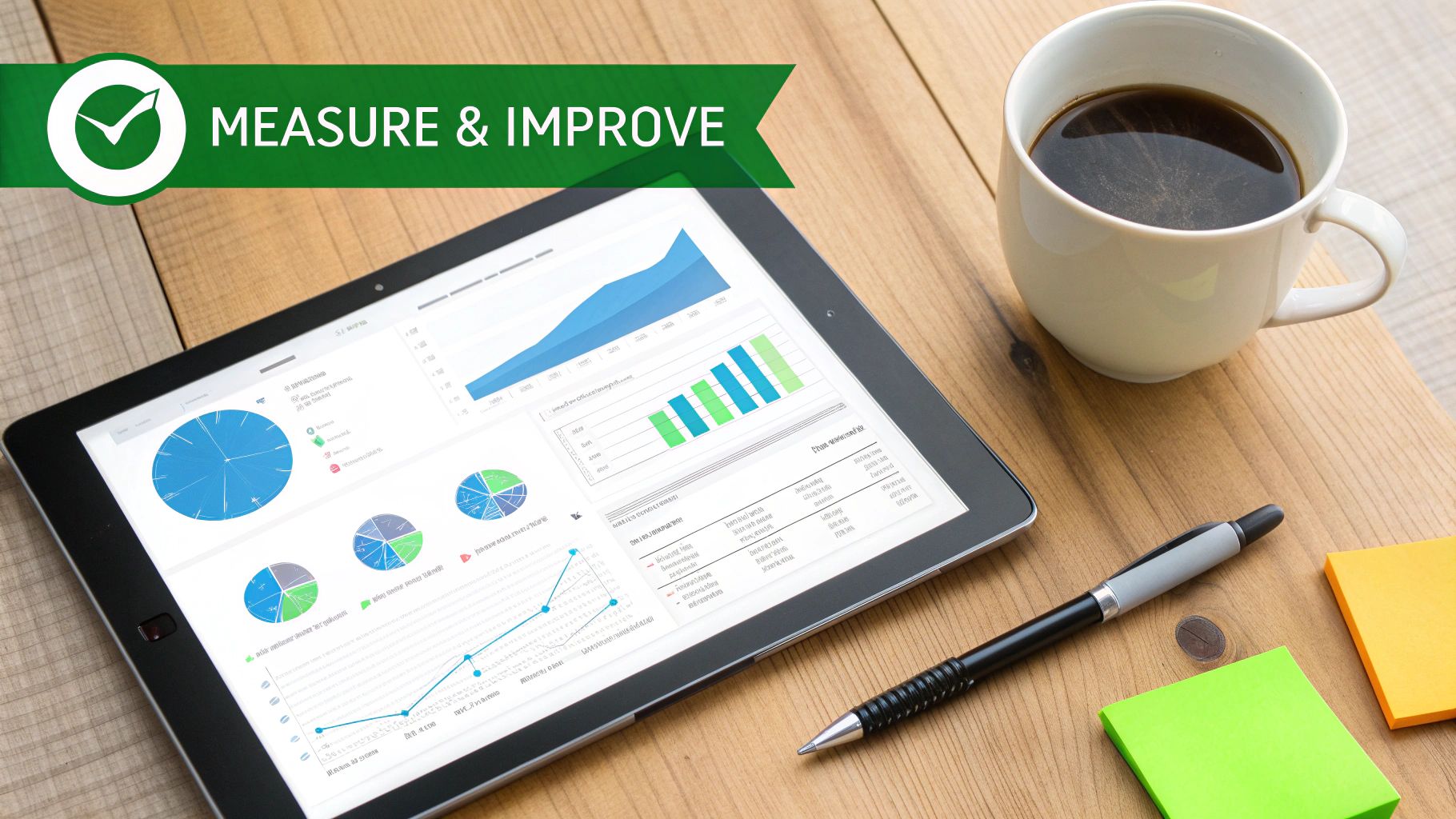
Putting your social media on autopilot without checking the results is like shouting into the wind. You’re putting content out there, but are you sure anyone is actually listening? A truly smart automation strategy isn’t just about scheduling posts—it’s about creating a data-driven feedback loop that makes your content better and better over time.
This is the part where you graduate from simply publishing content to strategically growing your audience. By keeping an eye on the right numbers and running a few simple tests, you can consistently fine-tune what you create and when it goes live, making sure every automated post pulls its weight.
Pinpointing the Metrics That Actually Matter
It's easy to get caught up in vanity metrics like follower count, but those numbers don't tell the whole story. To understand if your automated content—especially video—is hitting the mark, you need to dig into the metrics that show how your audience is reacting in real-time.
Here are the key performance indicators (KPIs) to focus on:
- 24-Hour View Counts: This is your first and best signal for how well a video’s topic and hook resonated with both the algorithm and your viewers. A strong start often means it has a good shot at going viral.
- Engagement Rate: Don't just glance at the raw number of likes and comments. Do the math: (Likes + Comments + Shares) ÷ Views. This gives you the real story of how engaging your content truly is.
- Audience Retention: Nearly every platform provides a chart showing you exactly when people drop off. If 50% of your audience bounces within the first three seconds, you know your hook isn't strong enough. The goal is to get them past that critical initial hurdle.
- Shares and Saves: These are "super-engagement" signals. A share is a personal endorsement—someone liked your content enough to attach their own name to it. A save means they see it as a valuable resource they want to come back to later.
A Simple Framework for A/B Testing
Figuring out what works is all about testing. The term "A/B testing" can sound intimidating, but for social media, it can be surprisingly straightforward. You just change one variable between two otherwise identical posts and see which one performs better.
The goal of A/B testing isn't to find one 'perfect' formula. It's to build an intuitive understanding of what your audience responds to, allowing you to make smarter creative decisions in your next content batch.
Here’s a practical example for a short-form video:
- The Control: You schedule a video with the caption, "3 surprising facts about ancient Rome." You post it at 8 AM.
- The Test: A few days later, you schedule the exact same video but tweak the caption to be more intriguing, like, "The last fact will change how you see the Roman Empire." This time, you post it at 6 PM.
Give both posts a few days, then compare their 24-hour view counts and engagement rates. Did the more dramatic hook grab more attention? Did the evening post time find a more active audience? These small experiments give you powerful insights to feed back into your system.
Building Your Continuous Improvement Loop
This is where it all comes together. You take all that performance data and use it to inform your next batch of AI-generated content. Think of your analytics less like a report card and more like an instruction manual for your content creation tools.
This feedback loop is what separates a basic automation setup from a truly professional one. Let's say after a month, you notice that your videos with a vintage sci-fi aesthetic consistently get 30% more shares than anything else you post.
What do you do? The next time you fire up MotionLaps, you can specifically tell the AI to prioritize that visual style. Suddenly, you’re not just guessing what might work—you’re making data-driven decisions that stack the odds of success in your favor with every new post. This cycle is a cornerstone of any successful video content marketing strategy.
This approach makes your organic content work much harder for you. With social ad spend projected to blow past USD 276 billion in 2025 and over 5.4 billion people on social media, you can't afford to waste organic opportunities. By automating your posts and using data to sharpen your creative, you improve performance and can be much smarter with your ad budget when you decide to boost your top-performing content.
Got Questions About Social Media Automation?
Diving into social media automation can feel like a big step, and it's normal to have a few questions buzzing around. Most people worry about their brand sounding robotic or getting tangled in a complex setup. Let's clear the air on some of the most common concerns.
The whole point isn't to let a robot take over your brand. It's about building a solid system that handles the grunt work, so you can focus on the creative, human parts of your job.
Will Automating Posts Make My Brand Seem Inauthentic?
This is the big one, right? And it’s a fair concern. But here’s the thing: smart automation actually protects your authenticity, it doesn't erase it. You're automating the repetitive, mechanical tasks—like the physical act of uploading and publishing—which frees you up for the stuff that actually requires a human touch.
Think about it. When you're not scrambling to post something every single day, you suddenly have more headspace for what matters:
- Jumping into conversations and replying thoughtfully to comments and DMs.
- Crafting genuinely creative content because you're not just trying to feed the algorithm.
- Spotting and engaging with trends as they happen in your industry.
Authenticity comes from your message and your engagement. Automation is just the delivery truck that makes sure your great content arrives on time.
How Much Does This Actually Cost?
The price tag can range from $0 to several hundred dollars a month. It really just depends on what you need and how big your operation is.
Many of the best tools have surprisingly robust free plans that are more than enough to get you started. Once you get the hang of it, you might upgrade to a mid-tier platform like Buffer or Later for a pretty reasonable monthly fee.
And when you're ready for maximum efficiency, tools that bundle content creation with scheduling—like MotionLaps—can often save you money by replacing two or three other subscriptions.
My advice has always been to start small. Grab a free tool, get into the rhythm of batching and scheduling, and prove the concept. Once you see how much time you’re getting back, you can justify investing in more powerful tools as your strategy (and revenue) grows.
Should I Use Native Schedulers or Third-Party Tools?
There’s a time and place for both, but if you're serious about scaling, third-party tools are the way to go.
Native schedulers (like Meta Business Suite) are fine for getting your feet wet. They’re simple, free, and occasionally get new features first. But that’s about where the advantages end.
A dedicated third-party tool gives you a central command center. Imagine managing your TikTok, YouTube, Instagram, and LinkedIn from one screen instead of hopping between four different apps. It’s a massive time-saver. Plus, you get powerful features like bulk scheduling, evergreen content queues, and way better analytics. The old myth about third-party tools hurting your reach is dead—modern tools use official APIs, so the platforms see the posts as completely native.
How Do I Keep My Feeds From Looking Repetitive?
A good automation workflow is designed for variation, not just mindless repetition. The secret is to tailor your content for each platform, even when you're working from the same core idea or video.
Almost any professional scheduling tool lets you customize the caption for each social network. This means you can schedule one video to go out to TikTok, Reels, and YouTube Shorts, but write a unique caption with different hashtags and a different call-to-action for each one. Some tools even use AI to whip up caption variations for you, giving you that native feel without all the manual copy-pasting.
Ready to stop the content grind and start building a scalable video engine? MotionLaps can help you generate and schedule a week's worth of viral-ready short-form videos in under an hour. Start creating for free at https://motionlaps.ai.