Free AI Body Swap — Replace the Whole Person in Any Photo
Swap a Full Person, Outfit and All, Into Any Scene
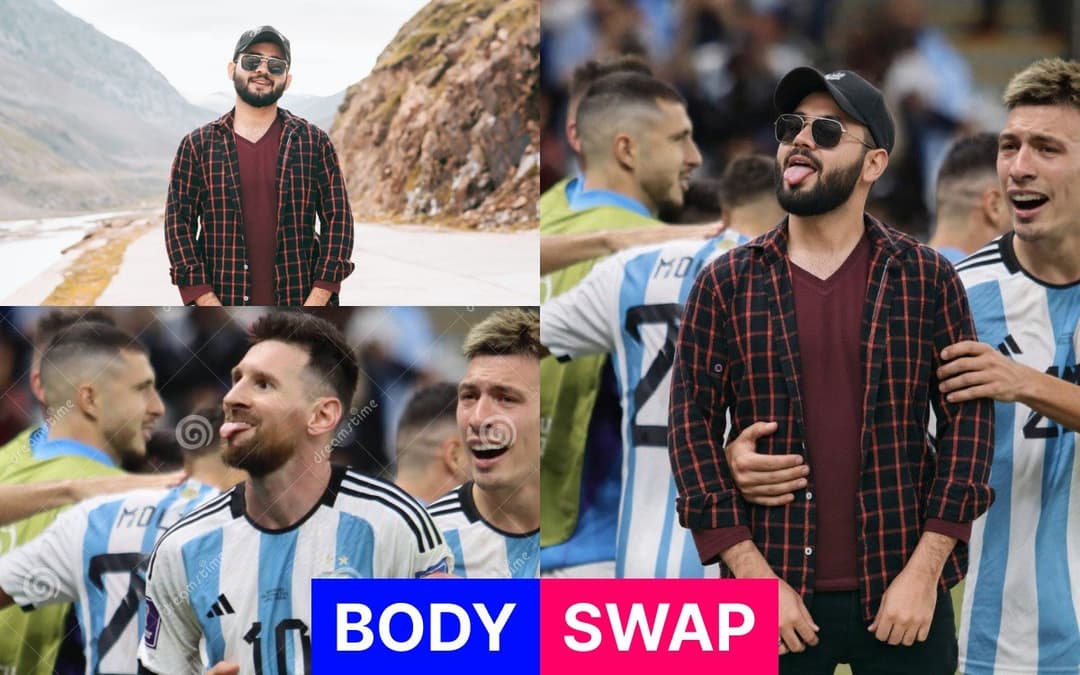
Body swap goes further than a face swap. Instead of changing just the face, it replaces the entire person in your photo — face, hair, body shape and the outfit they were wearing in the source picture — while keeping the target photo's scene exactly as it was: same background, same camera angle, same pose, same lighting. The result looks like the new person was standing there when the photo was taken. Great for putting yourself into travel shots, event photos, team pictures and scenes you never actually attended.

AI Body Swap Generator
Anything else to adjust — hair, age, lighting, retouching
Your Body Swap
Your body-swapped photo is ready to download
Result Time 5-20 seconds
How to Body Swap a Photo
Upload the Person and the Scene
Upload the source person first — a full-body or upper-body photo showing their face and the outfit you want to keep. Then upload the target photo, the scene you want them placed into. The clearer both photos are, the more detail the AI can carry across.
Let the AI Match the Scene
The AI takes only two things from your source photo — the person's identity and their outfit — and takes everything else from the target photo: the pose, facial expression, position in frame, background, camera angle and lighting. Nothing about the scene changes except who is standing in it.
Generate and Download
Generate in 5 to 20 seconds. The swapped person is re-lit to match the target photo's shadows, colour temperature and depth of field so they belong in the shot. Download at 1K or 2K in the aspect ratio that matches your original photo, or run several variations and pick the best one.
Create full videos for YouTube & social
Turn scripts, audio, and ideas into complete videos with AI voices, visuals, and export.
Script to Video
Paste your script, choose a style, and let AI create a professional video with voice narration, music, and visuals in minutes.
Learn moreAudio to Video AI
Our audio to video AI generator is an audio to video converter built for creators: upload an audio file or paste a YouTube/TikTok link, and turn audio into video with auto captions, AI-matched visuals, and MP3-to-video export—no camera or B-roll hunt required.
Learn moreTikTok Video Generator
Generate scroll-stopping TikTok videos with AI. Trending hooks, viral formats, faceless content - everything optimized for TikTok's algorithm. No filming, no editing, just viral content.
Learn moreAI Movie Maker
The AI movie creator and movie maker AI built for cinematic shorts: write a video prompt, get an AI generated movie with scenes, professional voices, music, and export—text to movie AI without a studio or film crew.
Learn moreFrequently Asked Questions
Everything you need to know about the AI Body Swap tool