Discover invideo vs. pictory vs. motionlaps: ai video tool comparison 2026
 Anika Riply
When you line up InVideo, Pictory, and MotionLaps, the "best" choice for 2026 really boils down to what you're trying to accomplish. InVideo is fantastic for marketers who need polished, template-driven videos fast. Pictory shines when you're repurposing content, like turning an article into a video. But for creators who need to pump out high-volume short-form content with minimal effort, MotionLaps delivers the most automated, hands-off workflow.
The 2026 AI Video Tool Landscape
Short-form video isn't just a trend anymore; it's the main event on social feeds. That means picking the right creation tool is more important than ever if you want to stay ahead. The market has grown up a lot, moving past basic text-to-video tools to offer specialized platforms for specific jobs. In 2026, the real question isn't which tool is the absolute best, but which one fits your content strategy like a glove.
This guide will break down three major players that have carved out their own niches: InVideo, Pictory, and MotionLaps.
- InVideo: Think of this as the all-rounder for social media marketers and businesses. It gives you a nice mix of AI help and manual control, making it perfect for creating slick promotional videos using its huge template library.
- Pictory: This is the undisputed champ of content repurposing. Its superpower is taking long-form text—like blog posts or webinar transcripts—and turning it into a compelling summary video with almost no fuss.
- MotionLaps: Built from the ground up for hyper-automation. This one is for the creators and agencies cranking out tons of short-form "faceless" videos for YouTube Shorts and TikTok. It automates just about everything, from the initial idea to the finished product.
To get a feel for where these tools sit, it helps to look at the bigger picture. When you check out reports on the top 12 best video ad creation software options for 2026, you see a clear pattern: specialization is the name of the game.
Quick Verdict Who Should Use Which Tool
To cut to the chase, this table lays out who will get the most value from each platform. Picking the right tool from day one can make a massive difference in how fast you can produce content and how good it looks. If you want to dig deeper into what separates the good from the great, check out our guide on the best AI video generator.
| Best For | InVideo | Pictory | MotionLaps |
|---|---|---|---|
| Social Media Marketers | Excellent – Strong template library for ads. | Good – Solid for turning articles into posts. | Good – Fast creation for organic content. |
| Bloggers & Podcasters | Fair – Can work but is not its primary focus. | Excellent – Best-in-class for repurposing. | Fair – Better for creating new content from ideas. |
| Automated "Faceless" Channels | Good – Possible but requires more manual work. | Good – Works well for script-based videos. | Excellent – Purpose-built for this workflow. |
| Creative Agencies (High Volume) | Good – Scalable with teams and brand kits. | Fair – Limited by its repurposing workflow. | Excellent – Unmatched speed for mass production. |
| Beginners Needing Simplicity | Good – Template-based system is easy to learn. | Good – Simple interface for text-to-video. | Excellent – The most hands-off, automated option. |
Ultimately, each tool is a powerhouse in its own right, but they solve different problems. Your job is to match the tool to your specific goal, whether that's creating a single stunning ad or automating an entire content channel.
Comparing Core AI Video Creation Features
When you're picking an AI video tool in 2026, the engine under the hood is what really matters. You have to look past the flashy marketing claims and see how these platforms actually perform when you put them to work. A real InVideo vs. Pictory vs. MotionLaps: AI video tool comparison for 2026 has to start with their core AI guts.
The biggest differences pop up in how each tool gets you from a simple idea to a finished video. Some are all about giving you creative control with templates, while others are built for pure, hands-off automation.
This infographic gives a great birds-eye view of where each tool stands.
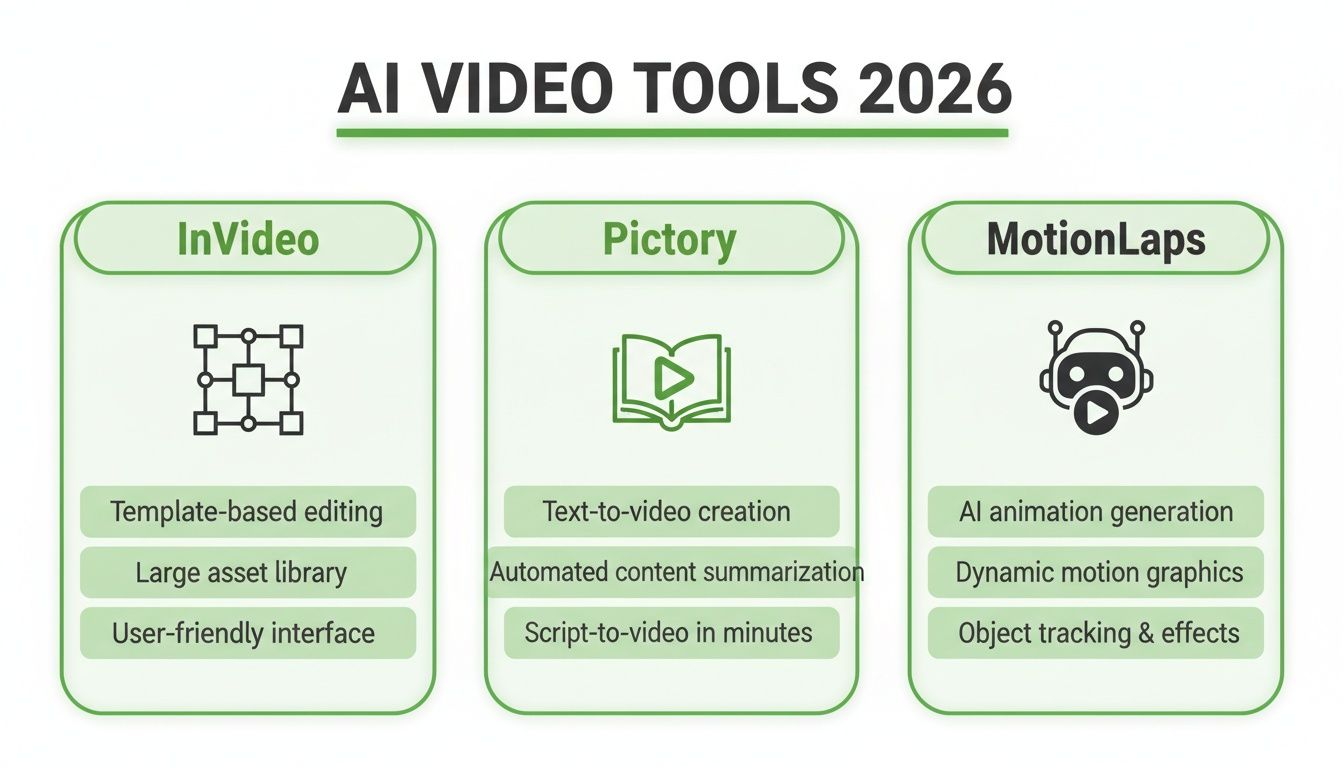
You can see their different philosophies at a glance: InVideo is built around its templates, Pictory starts with your text, and MotionLaps is designed for total automation.
AI Scripting and Ideation
The very first step—turning a thought into a story—is arguably the most important. This is where your video's direction gets locked in, and each tool handles it very differently.
- InVideo: Its scriptwriter shines when you feed it a specific topic and audience. A prompt like, "Create a 60-second TikTok about cold brew coffee for busy professionals," gives you a structured script with scene ideas. It’s built to plug right into its huge template library.
- Pictory: This tool isn't really a from-scratch scriptwriter. Its superpower is summarizing existing content. You give it a blog post, and its AI pulls out the key points to build a video script. Think of it more as a content repurposing machine.
- MotionLaps: This one is all about ideation. Its AI is fine-tuned to brainstorm viral-style hooks and stories for short-form content. A simple prompt like "surprising historical facts" can generate a complete, punchy script perfect for a faceless YouTube Short, with a focus on pacing and viewer retention right from the get-go.
The bottom line: InVideo writes scripts that fit its templates. Pictory turns your existing articles into scripts. MotionLaps cooks up original scripts designed to go viral. The right tool depends entirely on what you're starting with—an idea, a blog post, or a marketing goal.
Voice Synthesis and Quality
Let's be honest, a robotic AI voice can kill a video's vibe instantly. If the narration is clunky, people will just scroll on by.
- InVideo: Offers a large library of voices with options for different tones and emotions, giving you plenty of choices. It's a favorite for marketers who need variety.
- Pictory: Also offers a decent range of AI voices and includes voice cloning, which is a fantastic feature for brands that need a consistent sound. The quality is solid for straightforward explainer videos.
- MotionLaps: Specializes in incredibly human-like narration. It uses more advanced neural models to generate voices that have genuine tone and inflection, making them nearly impossible to tell apart from a real person. For faceless content channels where the voice is the personality, this is a game-changer.
Feature Benchmark InVideo vs Pictory vs MotionLaps
To really see how these platforms stack up, let's put their core features side-by-side. This table breaks down what each tool brings to the table for video creation.
| Feature | InVideo | Pictory | MotionLaps |
|---|---|---|---|
| AI Scripting | Generates scripts from prompts to fit templates | Summarizes existing text (articles, blogs) into scripts | Generates viral-style scripts and ideas from scratch |
| AI Voice Quality | Large library with emotional tones; good variety | Solid quality with easy voice cloning | High-fidelity, human-like neural synthesis |
| Visual Assets | Premium stock libraries (iStock) | Large stock video/image libraries | Generative AI images and video clips |
| Primary Workflow | Template-driven editing | Text-to-video conversion | Fully automated, prompt-to-video |
| Customization | Extensive template library and manual editor | Basic branding (colors, fonts, logos) | AI-powered style selection (e.g., comic book, ink wash) |
| Best For | Social media ads, marketing content, promos | Content repurposing, corporate training, faceless videos | Automated YouTube Shorts, TikToks, unique creative content |
As you can see, their strengths are in very different areas. Your choice really depends on whether you value templates, repurposing, or fully unique AI generation.
Visual Asset Generation and Relevance
The right visuals have to match the script perfectly to tell a cohesive story. Here’s where each tool gets its images and clips.
InVideo and Pictory both lean heavily on stock footage. Their libraries are enormous, which is great, but it also means you might end up using the same clips as five other channels in your niche.
MotionLaps sidesteps that problem entirely by generating unique AI visuals for every project. This gives creators a completely distinct look that helps them stand out from the crowd. If you want to get good at making this kind of content, our guide on using a social media video editor is a great place to start.
Template and Style Customization
Finally, how much can you actually make the video your own?
InVideo is the undisputed champ here. It has thousands of slick, professionally designed templates for just about anything you can think of, from Instagram ads to slick YouTube intros.
Pictory offers more basic customization. You can tweak fonts, change colors, and add your logo, but the overall structure of the video is pretty much locked in by its text-to-video engine.
MotionLaps takes a different route. Instead of templates, it gives you a curated menu of distinct visual styles—think Japanese ink wash, dark fantasy, or comic book. With a single click, you can set a unique mood and aesthetic for your entire channel.
From Idea to Published: A Look at Workflow and Speed
In the world of short-form video, speed is everything. It’s not just a nice-to-have; it's the thin line between a channel that pops off and one that gets lost in the noise. For creators and agencies pumping out content day after day, the workflow is the entire ballgame. This is where we see the real differences emerge between InVideo, Pictory, and MotionLaps in 2026.
Let's get practical and move beyond feature lists. I want to look at the entire journey, from a blank screen to a finished video. How many clicks does it really take? How much babysitting does the AI need? The answers will show you exactly which tool fits your production style.
InVideo: The Template-First Approach
InVideo’s workflow feels familiar, built for marketers who need a professional-looking video fast but aren't willing to give up all creative control. The entire process is anchored by its massive template library.
- Pick Your Template: You start by grabbing one of thousands of pre-built designs, already optimized for things like Instagram Reels or YouTube ads.
- Drop in Your Script: You can either use its AI to write something for you or just paste in your own text. The AI then slots your words into the template scenes.
- Get Hands-On: This is where you do the real work. You'll be swapping out stock clips, nudging text around, changing brand colors, and fine-tuning the timing on a traditional-style timeline.
While InVideo definitely gives you a head start with AI, the workflow still feels like a turbo-charged version of classic video editing. It saves you the headache of starting from scratch but expects you to handle the final polish. Realistically, creating a week's worth of YouTube Shorts (seven videos) could easily take a few hours, depending on how much you want to customize.
Pictory: The Repurposing Machine
Pictory’s whole reason for being is to breathe new life into your existing content, which makes its workflow totally different. It’s not really about creating from scratch; it’s about transformation.
Its main workflows are built around this idea:
- Article-to-Video: Just paste in a blog post URL. Pictory’s AI will summarize it, find what it thinks are relevant stock videos, and slap on captions.
- Script-to-Video: Give it a script, and it will build out scenes for you, line by line.
- Video Highlights: Got a long webinar or podcast? Upload it, and the AI will hunt for the juicy parts and chop them into short, shareable clips.
The automation for repurposing here is genuinely powerful, but it's not a one-and-done deal. You’ll spend a fair bit of time fixing awkward scene breaks, replacing odd stock footage choices, and cleaning up the AI’s summary. For someone whose main goal is turning articles into videos, it's a speed demon. But for creating original shorts, it can feel a bit clunky and indirect compared to the others.
My Take: Pictory automates the conversion of content, not necessarily the creation of it. It’s unbeatable for repurposing, but it’s not the fastest tool for generating brand-new ideas from the ground up.
MotionLaps: The Hyper-Automation Specialist
MotionLaps was built with a single, obsessive goal: automate short-form video creation as much as humanly (and artificially) possible. The workflow is designed to be almost completely hands-off, cutting out the need to manually pick assets or edit timelines.
The entire process is a simple three-step flow:
- Provide the Idea: Give it a prompt like "mind-blowing space facts." The AI generates a complete script optimized for retention.
- Select a Voice: Choose from a library of hyper-realistic AI voices.
- Pick a Style: Select a visual theme (e.g., "cinematic," "comic book").
The AI handles the rest: generating visuals, syncing the voiceover, adding music, and creating captions. This "prompt-to-publish" approach can turn an idea into a finished YouTube Short in under five minutes. For a deeper dive into the tech, you can check out this AI video generator comparison on massive.io.
This workflow is a massive shift for anyone focused on volume. A creator could realistically batch an entire week's worth of YouTube Shorts on MotionLaps in about 30 minutes. That kind of speed completely changes the game, letting channels scale their output without scaling their team or their time, moving the focus from tedious editing to high-level strategy and creative ideas.
Assessing Output Quality and Platform Optimization
A slick workflow doesn't mean much if the final video falls flat. When we're talking about AI video tools in 2026, the real test is the quality of the video itself and how well it’s built for platforms like TikTok, YouTube Shorts, and Instagram Reels. This is where the small details—resolution, audio clarity, and visual style—can make or break your content.
A high-quality video is more than just sharp pixels; it’s about making sure the script, voiceover, and visuals all click together into a cohesive whole. So when I'm looking at the final product from these tools, I’m digging deeper than the initial AI-generated draft to see what really drives engagement.
This is a make-or-break part of the invideo vs. pictory vs. motionlaps: ai video tool comparison 2026. A tool that spits out generic, low-effort content will only damage your brand in the long run.
Video Resolution and Visual Cohesion
High-definition is the standard for short-form video, and all three tools deliver on that front, typically exporting in 1080p. The bigger question is about visual cohesion—how well do the AI-chosen scenes actually match the script and each other? This is where the tools really start to differ.
-
InVideo: Taps into a massive stock footage library from places like iStock, so the individual clips look fantastic. The challenge, however, is that the AI's choices can feel a bit random, sometimes forcing you to manually hunt for assets that tell a more connected story.
-
Pictory: Also pulls from stock libraries and does a decent job of matching keywords from your script to relevant clips. The catch is that the visual style can feel a bit all over the place, jumping between different types of footage that don't quite share the same vibe.
-
MotionLaps: This is where MotionLaps stands out. By generating its own AI visuals instead of using stock footage, it nails aesthetic consistency. If you pick a style like "comic book" or "dark fantasy," every single scene shares that artistic DNA, giving you a completely cohesive and branded look.
For anyone trying to build a recognizable brand, keeping a consistent visual style is a huge deal. MotionLaps's approach solves the "Frankenstein" video problem you often get from mismatched stock clips.
Audio Clarity and Voiceover Quality
You can't afford to have bad audio. Viewers will click away in a heartbeat. While all three tools have decent AI voices, the realism and quality are what set them apart and directly impact how long people watch.
Both InVideo and Pictory offer a solid lineup of standard AI voices that are clear and get the job done for things like corporate explainers. Pictory's voice cloning is also a nice touch for maintaining brand consistency. But if your narration is the main attraction—like for a faceless YouTube channel—you need something that sounds more human.
This is where MotionLaps has put its focus, using more advanced tech to produce voices with natural-sounding inflections and rhythm. That higher-quality audio makes the final video feel less like an AI churned it out and more like something professionally produced, which can do wonders for your watch time and audience trust.
Platform Specific Optimizations
Beyond raw quality, a smart AI video tool has to understand the platforms it’s creating for. That means thinking about vertical aspect ratios, creating captions that pop, and keeping file sizes in check for quick uploads.
Here’s how they stack up on platform-specific features:
| Optimization Feature | InVideo | Pictory | MotionLaps |
|---|---|---|---|
| Aspect Ratios | Multiple presets (16:9, 9:16, 1:1) | Automatic vertical formatting | Natively built for 9:16 shorts |
| Auto-Captions | Multiple animation styles and fonts | Several clean, easy-to-read styles | Dynamic, retention-focused styles |
| Royalty-Free Assets | Extensive stock video and music | Large library of stock assets | Curated royalty-free music library |
| File Compression | Standard export options | Standard export options | Optimized for fast social upload |
After the AI has done its part, you'll still want to fine-tune the output for each platform. Learning about optimizing videos for platforms like YouTube and TikTok is a crucial final step to make sure your content loads quickly without looking blurry. This last bit of polish is key to getting the most reach and engagement possible.
Real-World Use Cases for Different Creators
Feature lists are one thing, but how these tools actually hold up in the day-to-day grind of content creation is what really matters. To make this InVideo vs. Pictory vs. MotionLaps: AI Video Tool Comparison 2026 genuinely useful, let's walk through how each platform fits the specific needs of three very different types of creators. The "best" tool really comes down to your goals, whether you're scaling a marketing agency or just trying to get more mileage out of your podcast.
Ultimately, you need a tool that slots right into your daily workflow. For some, it's all about raw speed. For others, it's about keeping brand styles perfectly consistent across dozens of client accounts.
The YouTube Shorts Creator
If you're building a "faceless" YouTube Shorts channel, your life revolves around two things: volume and consistency. The name of the game is publishing multiple high-quality videos daily without getting bogged down in editing. You need a tool that does pretty much everything for you, from scripting to final visuals.
MotionLaps is the hands-down winner here. Its entire system is engineered for this exact purpose. You can feed it a simple idea—"surprising facts about ancient Rome," for instance—and its AI will spit out a complete, retention-optimized script. From there, it layers on a surprisingly human-sounding voiceover and generates unique, on-theme visuals in whatever style you’ve chosen.
The ability to batch-produce an entire week's worth of content in less than an hour is a game-changer. Sure, you could use InVideo, but you'd spend ages in the timeline editor trying to replicate what MotionLaps does automatically. Pictory is an option if you bring your own scripts, but its reliance on stock footage can make your channel feel generic and repetitive pretty quickly.
The Social Media Marketing Agency
An agency’s world is far more complex. You're juggling multiple clients, each with their own brand kit, voice, and content schedule. The ideal tool has to offer scalability, rock-solid brand management, and the flexibility to create everything from quick social ads to in-depth explainer videos.
This is where InVideo really pulls ahead. Its team features and brand kit management are built with agencies in mind. You can set up and save custom templates for each client, locking in their specific colors, fonts, and logos to ensure nothing goes off-brand. The massive library of professional templates gives you a huge head start on campaigns, which junior editors can then customize.
While MotionLaps could be a secret weapon for agencies running faceless content channels for clients, InVideo's broader, template-driven approach is more versatile for general social media marketing. Pictory, with its limited customization and focus on repurposing existing content, just isn't designed for the demands of original agency ad creation.
The Podcaster or Blogger
For podcasters and bloggers, the main goal is to squeeze every last drop of value from long-form content. You've already put in the hard work of writing a 2,000-word article or recording a one-hour episode; now you need a dead-simple way to transform that asset into bite-sized, engaging video for social media.
This is Pictory's home turf, plain and simple. Its "Article-to-Video" and audio-to-video features are built specifically for this job and do it better than anyone else. A blogger can just paste a URL, and Pictory's AI will summarize the text, pull out the key sentences, and automatically find relevant stock footage to create a summary video in minutes. It absolutely excels at this kind of content repurposing.
Case Study in Action: A finance blogger used Pictory to turn their top 10 most-viewed articles into short summary videos for Instagram Reels. This simple tactic increased their Instagram profile visits from search by 40% in just one month, as the videos captured an audience that preferred watching to reading.
If you're just dipping your toes into this space, our guide on how to create AI video offers a solid primer that will help you make the most of whichever platform you land on.
The Final Verdict: Which AI Video Tool Is Right for You in 2026?
After putting InVideo, Pictory, and MotionLaps head-to-head, it’s clear there’s no single winner. The best choice really boils down to what you’re trying to accomplish. Each tool is built for a different kind of creator and a different kind of workflow.
The real question you should ask is: what's my starting point? Are you working from a detailed marketing brief, a finished blog post, or just a spark of an idea? Your answer will point you straight to the right platform.
Our Top Picks for Specific Creators
Let's break it down by who you are and what you need.
-
Best for Marketers & Agencies: Go with InVideo. Its massive template library, branding tools, and detailed timeline editor offer the perfect mix of AI assistance and hands-on control. It's built for creating polished, on-brand ads and promotional videos where quality and precision are key.
-
Best for Bloggers & Podcasters: Pictory is still the king of content repurposing. Nothing else comes close to its ability to take a long blog post, a webinar transcript, or an audio file and quickly spin it into an engaging summary video. It's a massive time-saver for anyone looking to get more mileage out of their existing content.
The Bottom Line: If your goal is pure, high-volume automation for short-form video, MotionLaps is in a league of its own. It was designed from the ground up for creators who need to pump out content quickly and consistently, making it the perfect engine for scaling "faceless" channels on YouTube Shorts and TikTok.
When it comes down to it, MotionLaps is our top recommendation for creators building automated "faceless" content channels. Its direct prompt-to-video workflow is engineered for churning out viral-style shorts at a speed and scale the other tools just can't touch. If your game plan is all about daily output with the least amount of manual work, MotionLaps is the undisputed winner for 2026.
Frequently Asked Questions
When you're comparing tools as powerful as InVideo, Pictory, and MotionLaps, a few common questions always pop up. Let's dig into them so you can get the last few details you need to make the right call.
Which Tool Is Best For A Complete Beginner?
If you're starting from absolute zero with no video experience, MotionLaps is your most direct path. Its three-step process—script, voice, music—is almost entirely automated. You won't find yourself staring at a timeline or manually picking assets.
InVideo is a close second. It's easy to get started thanks to its huge template library, but you'll probably need to spend more time in the editor tweaking things to get the video looking just right. Pictory is simple for turning existing text into video, but it requires a bit more manual review to polish what the AI spits out.
Can I Use My Own Voiceover With These Tools?
Absolutely. All three platforms let you upload your own voice files. InVideo and Pictory are particularly strong here, giving you solid tools to manually sync your audio track perfectly with the on-screen visuals.
MotionLaps supports custom voiceovers too, but honestly, its biggest advantage is the incredibly high-quality AI voice synthesis it has built-in. It's designed to sound so human-like that it saves you the recording step altogether while still sounding professional.
How Do Pricing And Usage Limits Compare For High-Volume Creation?
This is where the business models really start to matter, especially if you're churning out content daily. InVideo’s plans usually put a cap on how many AI generation minutes or premium exports you get each month. Pictory tends to structure its plans around the total number of video minutes you can create.
For anyone serious about high-volume production, MotionLaps stands out. Many of its plans come with unlimited video renders. This is a game-changer if you’re trying to grow a channel fast, as you can publish new short-form content every single day without ever worrying about hitting a limit. It’s built for scale.
Ready to build your automated content channel? Discover how MotionLaps can turn your ideas into viral-ready videos in minutes, no editing required. Get started with MotionLaps today.